React Hooks , introduced in version 16.8.0, are reusable stateful logic functions. They aim to simplify the development of complex components by splitting them into small functional blocks that are easier to manage, test and reuse.
Using hooks removes the need for many abstractions like Higher Order Components (HOC) and render props. They allow you to add functionality to the application without having to change the component hierarchy and without having to encapsulate components.
Also, it often makes the code more readable and maintainable.
As an example, here is a simple React clock component written using classes:
In our example, both useState and useEffect are React hooks.
What is GraphQL?
GraphQL is a data query language designed for API. The language is meant to be declarative, strongly typed and exhaustive.
The design has two main types of operations: queries and mutations. The former is used when retrieving data, the latter for updating data.
Another important improvement of GraphQL is that multiple operations can be sent and retrieved using a single endpoint (usually /graphql) and a single network request. This reduces the number of roundtrips and overall data transfer, which is very important on mobile devices and bad network situations.
Here's an example of a GraphQL mutation which adds a new user (and chooses which field to get a result):
mutation CreateUser($name: String!){
  createUser(name: $name) {
    name
  }
}
And here's an example of a GraphQL query which gets the list of users:
{
  users {
    name
  }
}
Introducing graphql-hooks
In order to use GraphQL in a React application using hooks, we are going to use graphql-hooks , a small library with hooks support and optional Server-Side Rendering and caching support.
Here's an example of how a real-world component might look like:
import { useQuery } from 'graphql-hooks'

const HOMEPAGE_QUERY = `query HomePage($limit: Int) {
  users(limit: $limit) {
    id
    name
  }
}`

function MyComponent() {
  const { loading, error, data } = useQuery(HOMEPAGE_QUERY, { variables: { limit: 10 } })

  if (loading) return 'Loading...'
  if (error) return 'Something Bad Happened'

  return (
    <ul>
      {data.users.map(({ id, name }) => (
        <li key={id}>{name}</li>
      ))}
    </ul>
  )
}
Getting started on the server
To get started, let's create an application server which serves a React application.
The app-shell.js file is responsible for Server Side Rendering, the initial version injects the Javascript file created by webpack inside a bare metal HTML page:
const { getBundlePath } = require('../helpers/manifest')

function renderHead() {
  return `


  `
}

async function renderScripts() {
  const appShellBundlePath = await getBundlePath('app-shell.js')
  return `
    <script src="${appShellBundlePath}"></script>
  `
}

async function appShellHandler(req, reply) {
  const head = renderHead()
  const scripts = await renderScripts()

  const html = `
    ${head}
      <div id="app-root"></div>
    ${scripts}
  `
  reply.type('text/html')
  return html
}

module.exports = appShellHandler
The graphql.js file is where our tutorial will focus on. Here's the starting version:
const fastifyGQL =require('fastify-gql')const userList =[{name:'Brian'},{name:'Jack'},{name:'Joe'},{name:'Kristin'}]const schema =` type User {
name: String
}
type Query {
users: [User]
}
`const resolvers ={Query:{users(){return userList
}}}functionregisterGraphQL(fastify, opts, next){ fastify.register(fastifyGQL,{ schema, resolvers,graphiql:true})next()}module.exports= registerGraphQL
js
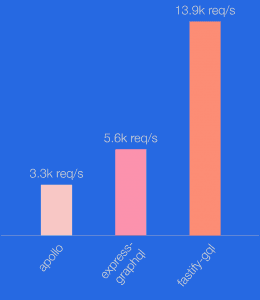
The GraphQL adapter we chose on the server is Mercurius . We evaluated other solutions but it had higher performances, as you can see in the comparison below.
Before moving on, let’s analyze the options passed to the adapter.
The very first thing to define when creating a GraphQL API is the schema. The schema must define all the queries, mutation and types supported by the API. In particular, Query and Mutation are considered “entry-point” types and of them should be present in every schema.
In our case, we define only Query (for now) and we define a single query, users, which will return a list (which is denoted using square brackets) of User. The User is the only other type in the schema, which contains a single string field called name. As you might wonder, GraphQL is language-agnostic, so the definition of language syntax tries to be similar to most used languages.
Once we have the schema ready, we need to pass the resolvers. As the name might suggest, resolvers is a Javascript mapping object which allows the adapter to map GraphQL queries or mutation to real application call. In our case, when performing the users GraphQL query (which we can rewrite using the dotted notation as schema.Query.users) it will execute the resolvers.Query.users (note that the path is the same) and the return value will be the result of the query.
In our example, we also passed the graphiql option set to true. This will add graphiql (note the i ), an in-browser IDE for GraphQL to the server, at the /graphiql route.
Getting started on the client
The initial version of the client application is very simple: only two routes, one of them is a simple "hello world" one. Let's see what they look like.
Here's the application main file:
import React from 'react'
import { Link, Router } from '@reach/router'

// components
import ListUsers from './pages/ListUsers'

function HelloWorld() {
  return (
    <div>
      <h1>Hello World</h1>
    </div>
  )
}

class AppShell extends React.Component {
  render() {
    return (
      <div></div>
      <nav></nav>
         Hello World |{" "}
         List Users    )
  }
}

AppShell.propTypes = {}

render(AppShell, document.getElementById('app-root'))
And here’s the initial version of the ListUsers route:
There are many values returned by the useHook query, but for now, let's focus on the main ones. data contains the results of the query returned by the server, while refetch is a callback that enables the client to ask for a data refresh on-demand.
The useMutation hook instead simply returns an async function which will trigger a mutation on the server.
Notice that the component uses both React Hooks (useState) and graphql-hooks hooks. This is an example of where the hooks approach makes it really simple to add new functionality to components (even via external libraries) without having to reorganize the component hierarchy.
And there it is: a fully working client-server application using GraphQL and React hooks.
Pagination
So far, the users GraphQL has returned all the users stored in the system. As you might imagine, this is not useful in the real world where you usually have thousands or millions of them. So, let's implement pagination.
To achieve this, we are going to use a mechanism you have already seen: query variables. If you look at the createNewUser method above, you will notice that it passes variables to the mutation. This is also possible for queries.
Let's start by modifying the schema and the resolvers in the graphql.js file of the server:
const schema =` type User {
name: String
}
type Query {
users(skip: Int, limit: Int): [User]
}
type Mutation {
createUser(name: String!): User
}
`const resolvers ={Query:{users(_,{ skip =0, limit }){return limit ? userList.slice(skip, skip + limit): userList.slice(skip)}},Mutation:{createUser(_, user){ userList.push(user)return user
}}}
js
As you can see, the user's query is now parameterized. That's all we need to modify on the server, so let's switch back on the client.
Let's create a new PaginationPage, which will be rendered under the /users path.
Despite what the name suggests, this plugin is not a server plugin backed by MemCache storage, but it is a client plugin which caches every operation by creating a hash of it. The cache is held in memory using a Least Recently Used (LRU) policy.
To use it, simply pass it the client application main file when instantiating the graphql-hooks client:
The last step of this tutorial to have a fully working real-case example is to hook up graphql-hooks in a server-side rendered (SSR) application.
Doing this will allow the same client code to be reused on the server to return fully rendered pages. This improves browser boot and time to be interactive time and also improves search engine optimisation.
Also, by using state passing and rehydration, we can make sure no cache miss happens on the client after initial loading.
To get started, we are going to modify the client initialization to use isomorphic-unfetch . This enables fetch support on server (Node.js) and polyfills on the client if needed.
The newly modified server app shell will look like this:
The main modification is the introduction of the same GraphQL client on the server, with slightly different options: first, we have to specify the full client URL, then we have to specify the fetch method to use.
Then we use getInitialState from graphql-hooks-ssr in order to get the state to send to the client, rendered as serialized JSON inside the renderScripts function.
Once the server is ready, let's modify the client. We have to modify the application main file in order to account for the initialState of the cache and the rehydration of the server-side rendered page.
The main modification are passing the initialState to the cache plugin and to replace the react-dom render with hydrate.
Conclusions
As shown in this post, graphql-hooks is a powerful package to easily add GraphQL to your React application using a very easy to use approach. Also, its plugin-based approach makes it very trivial to add complex features like caching and SSR without any cumbersome abstractions and without revolutionizing your components or application structure.
At NearForm, we have vast experience in building solutions across a broad tech stack to deliver reduced complexities and overcome common hurdles. If you are creating modern applications and leveraging web technologies, contact us to learn more about how we can help. You might also like some of our previous blog posts on React: