React Game Kit is Formidable’s newest release, written by the one and only Ken Wheeler. Since Ken is busy killing it in Israel at ReactNext, I’m giving a rundown of what React Game Kit is and why you should use it. Ken’s slides from his React Next talk can be found here, and I highly recommend you take a look at them.
Game Dev Basics
Should Can you build a game with React?
You sure can!
Why would you build a game with React?
The same game code can work on the web, iOS & Android
You primarily write React code
You dont feel like learning Unity
You can hot reload game logic
What is a game?
“A form of play or sport, especially a competitive one played according to rules and decided by skill, strength, or luck.”
Today we are going to learn how to make a 2d platformer game with ReactJS.
Basic Concepts
Game Loop
A programmatic loop that gets input, updates game state and draws the game.
Tick
Each step of the loop.
Update Function
A function called on each tick where game logic is checked.
Stage
The main game container to which game entities are added.
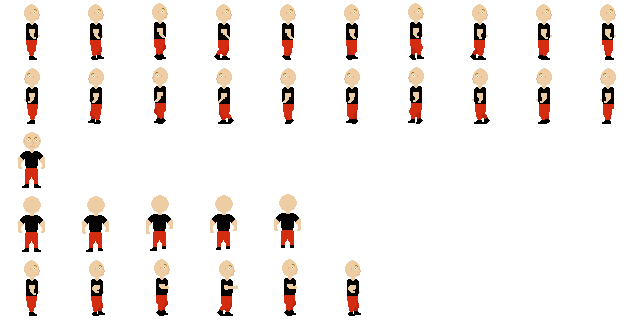
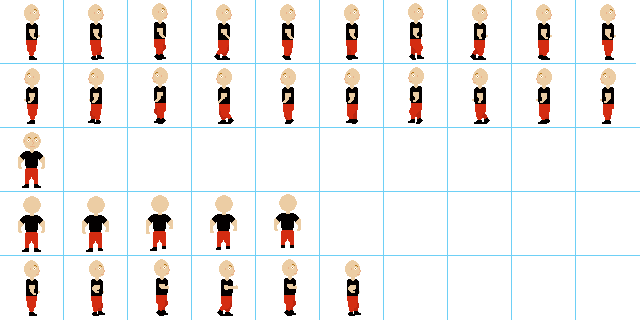
Sprite
An often animated bitmap graphic derived from a larger tiled image of states and steps.
TileMap
A large graphic created by rendering a matrix of position indexes derived from a smaller set of common tiles.
Physics Engine
A class that simulates physical systems.
Rigid Body Physics Engine
A physics engine that assumes that physical bodies are not elastic or fluid.
Physics World
A class that provides a set of conditions that the simulation abides by.
Physics Body
A class that acts as an entity inside the physics world.
This sounds hard.
But it doesn’t have to be!
Introducing: react-game-kit. A collection of ReactJS components and utilities that help you make awesome games. It’s pretty fun, all of the slides here are built with it. Oh, and it works on React Native too!
The Loop
How does the loop work?
requestAnimationFrame
let animationFrame;constloop=()=>{// Update logic animationFrame =requestAnimationFrame(loop);}animationFrame =requestAnimationFrame(loop);
js
How can I implement this in React with react-game-kit?
classGameextendsComponent{render(){return(// Child components get this.context.loop )}}
js
Wait, how does context work?
classExampleextendsComponent{static contextTypes ={loop:PropTypes.object,};loop=()=>{//Do stuff here };componentDidMount(){this.loopID=this.context.loop.subscribe(this.loop);}componentWillUnmount(){this.context.loop.unsubscribe(this.loopID);}}
js
Scaling
How can we size and scale our game?
transform: scale()
Rounding errors on subpixel floats mean we have to manually round & scale. react-game-kit provides a Stage component to help with this.
classGameextendsComponent{render(){return(// Child components get this.context.scale )}}
js
Most screens you are targeting will have a 16:9 aspect ratio.
getWrapperStyles(){const x =Math.round(this.state.x*this.context.scale);return{position:'absolute',transform:`translate(${x}px, 0px) translateZ(0)`,transformOrigin:'top left',};}
getImageStyles(){const left =this.state.step* tileWidth;const top =this.state.state* tileHeight;return{position:'absolute',transform:`translate(-${left}px, -${top}px)`,};}
js
react-game-kit provides a Sprite component to simplify this process.
return();
js
Tilemaps
What in the world is a tilemap?
Tile maps use a tile atlas to use a few graphics to create a “level”.
layers.forEach((l, index)=>{const layer =[];for(let r =0; r < rows; r++){// Loop over rows for(let c =0; c < columns; c++){// Loop over columns const gridIndex =(r * columns)+ c;// Get index in grid if(layer[gridIndex]!==0){// If it isn't 0 layer.push({row: r,column: c,tileIndex: layer[gridIndex]})}}}}
js
react-game-kit provides a TileMap component to simplify this process.
getTileStyles(column, row, size){const left = column * size;const top = row * size;return{height: size,width: size,overflow:'hidden',position:'absolute',transform:`translate(${left}px, ${top}px)`,};}
When using matter-js physics, it’s important to do physics updates after the world has updated.
classWorldChildextendsComponent{update=()=>{//Logic goes here }componentDidMount(){Matter.Events.on(this.context.engine,'afterUpdate',this.update);}componentWillUnmount(){Matter.Events.off(this.context.engine,'afterUpdate',this.update);}}
classWorldChildextendsComponent{move=(body, x)=>{Matter.Body.setVelocity(body,{ x,y:0});};update=()=>{const{ body }=this.body;if(keys.isDown(keys.LEFT)){this.move(body,-5);}elseif(keys.isDown(keys.RIGHT)){this.move(body,5);}};//...}