
Studio Live Preview with Next.js App Router
If you’ve landed on this blog post, you’re probably no stranger to Next.js and Sanity. It’s a pairing we’re seeing more and more often, and with good reason. Next.js is a popular and powerful framework for building server-side rendered and statically generated React applications with excellent developer experience and built-in optimized performance. Sanity offers real-time collaboration and highly flexible data modeling that’s enjoyed by content creators and developers alike.
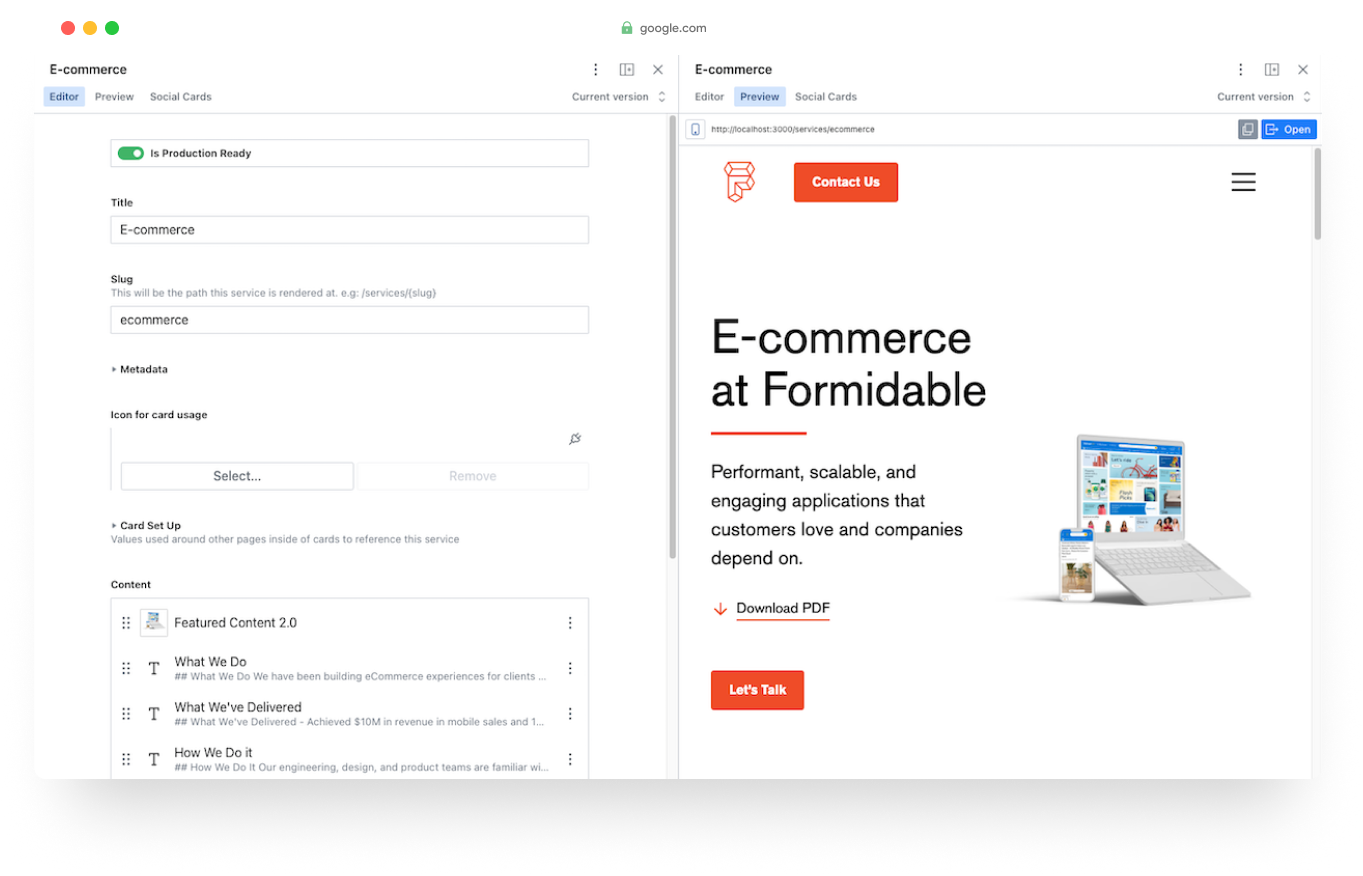
Moving from a traditional CMS to a headless CMS often came with the downside of having to publish content first then check out those changes in production. Configuring live previews in Sanity Studio enable content creators to see real-time updates and changes to their content as they edit it within the CMS. This feature provides a dynamic and interactive editing experience, enhancing productivity and streamlining the content creation process. Live previews should be a crucial part of headless CMS authoring; your content creators and team need to feel confident in their changes before publishing. Below, I give a high level explanation of one possible solution for adding live previews to your Next.js and Sanity driven application.
Keep in mind, this example is especially useful for statically generated sites, where pages are generated at build time. Statically generating your site content will give a boost to end-user performance, but it also means any changes to the site won’t be visible until after a full build cycle. Establishing your live previews in the manner I outline below gives you the ability to preview content more efficiently by fetching data at request time, via Next.js draftMode (more on this in step #2).
App Router and Draft Mode
New this year with Next.js v13 is the App Router architecture. Next.js has had draftMode functionality prior to the App Router change, but it looks slightly different in the latest version. Draft mode will be the foundation of your live preview setup. The Next.js docs are a great starting point to configure draft mode.
⚠️ This article assumes the user is logged into the same project’s Sanity Studio. You won't need to add additional authentication logic or a token for this process.
Set Up Your Live Preview
The basic functionality of this process is: your Next.js application is rendered in an iframe within Sanity Studio view frames. Let’s get into it!
Quick guide of the steps:
- Add the preview
viewto your sanity desk structure configuration- Create a preview endpoint in Next.js for Sanity to hit and enable
draftMode- Resolve the preview path based on url parameters
-
In your Studio code, wherever you define your desk structure (i.e.
sanity.config.js,deskStructure.js), add apreviewViewwith the iframe-pane plugin- Define the previewUrl, this is where your Next.js code is deployed and accessible (not localhost). This could be a deployed staging url or simply
window.location.origin. In the example below, we use an environment variable that allows developers to update the url for testing purposes - This method can be extracted and added to individual
viewsor written inline
Example
const makeLivePreviewViews = (S) => [ S.view .component(IFrame) .icon(RiImageFill) .options({ url: async (doc) => { const previewUrl = new URL(process.env.SANITY_STUDIO_PREVIEW_URL) || new URL(`${window.location.origin}/api/preview`) previewUrl.searchParams.append("_type", doc._type) previewUrl.searchParams.append("_id", doc._id) const previewPath = await fetch(previewUrl).then((res) => res.url) return previewPath }, reload: { revision: 300 }, }) .title("Preview"), ]jsx - Define the previewUrl, this is where your Next.js code is deployed and accessible (not localhost). This could be a deployed staging url or simply
-
Add an
/api/previewroute to your Next.js app and enable draft mode- The Studio preview pane will send a request to this route with
_typeand_idurl parameters that allow us to map to the proper page - calling
draftMode().enable()sets a cookie that enables fetching data at request time, instead of build time
Example
import { draftMode } from "next/headers" import { NextResponse } from "next/server" /** We'll talk about this helper function a little later */ import { documentPrimitivesToPath } from "@/utils/documentPrimitivesToPath" export async function GET(req: Request) { const { searchParams } = new URL(req.url) const _type = searchParams.get("_type") const _id = searchParams.get("_id") // Require all params if (!_type || !_id) return new NextResponse("Invalid params", { status: 400 }) // Check that _type and _id are valid, and grab enough info to determine preview path try { const path = await documentPrimitivesToPath({ _id, _type }) // Set draft mode cookie that enables fetching data at request time (instead of at build time) draftMode().enable() return new NextResponse(null, { status: 307, headers: { Location: path, }, }) } catch (e) { return new NextResponse("Not found", { status: 404 }) } }jsx - The Studio preview pane will send a request to this route with
-
Map document primitives to their corresponding paths
- Create a utility function to map the documents’
_typeand_idto a page.
Example
import { q } from "groqd" import { runQuery } from "@/sanity/client" import { SchemaTypes } from "@/sanity/schemas/schemaTypes" /** * Given a document's _id and _type, return the path to its page. */ export const documentPrimitivesToPath = async ({ _id, _type, }: { _id: string _type: string }) => { /** Retrieve documents from Sanity and define data to return */ const doc = await runQuery( q("*") .filter(`_type == $type && _id == $id`) .grab$( { _id: q.string() }, { "_type == 'blockPage'": { _type: q.literal("blockPage"), slug: q.slug("slug"), }, "_type == 'headerConfig'": { _type: q.literal("headerConfig"), }, "_type == 'blogPost'": { _type: q.literal("blogPost"), slug: q.slug("slug"), date: q.string().optional().default(DEFAULT_BLOG_DATE), } } ) .slice(0), { type: _type, id: _id, } ) if (!(doc && "_id" in doc)) throw new Error("Invalid document") // Determine preview path based on type. let path = "" if ("_type" in doc) { if (doc._type === "blockPage") path = doc.slug else if (doc._type === "headerConfig") path = "/" else if (doc._type === "blogPost") path = `/blog/${doc.date}` } return path }jsx - Create a utility function to map the documents’
🙌🏼 That’s it! Three steps to build live previews within your Sanity Studio using the power of Next.js App Router and draftMode. Deploy your app and checkout your new Preview Pane. You have ample room for customization to tailor this solution to your specific needs. For example, you could decide to only add the preview pane to certain document views, configure different paths for unique scenarios within your data model, or add more authentication protection with a preview secret. Live previews are also beneficial when combined with document-level localization, as a way to ensure your app looks as expected when a different language is selected.
Your Content Creators Will Thank You
With live previews in place, content creators can make changes in the Sanity Studio and see the immediate impact on the live website without having to navigate back and forth between tabs or windows. This real-time preview functionality improves collaboration, speeds up content creation, and allows for better visualizing and fine-tuning of the final output.
But wait - there's more.
Nearform publishes real-world learnings on data & AI, engineering, and digital strategy - with more merged in weekly.
Insights
Perspectives on AI in engineering, product development, and strategy, for enterprise executives.
Community
Deep dives and tutorials by engineers, for engineers.