This article expands on some talks at JSNation US, International JavaScript Conference, and Codemotion Milan, where I walked through how we built the Node.js MCP server and what we learned along the way.
MCP is a standard protocol that lets an LLM call your code and use your tools. This makes it much easier to connect a model with other services, systems, and applications. Instead of copy-pasting code, following suggestions, and iterating by hand, the LLM can act on your behalf. You define the tools once, and the model knows how to use them safely and consistently. For developers, this means less manual work and faster paths from idea to working solution.
This article expands on some talks at JSNation US, International JavaScript Conference, and Codemotion Milan, where I walked through how we built the Node.js MCP server and what we learned along the way.
What is MCP
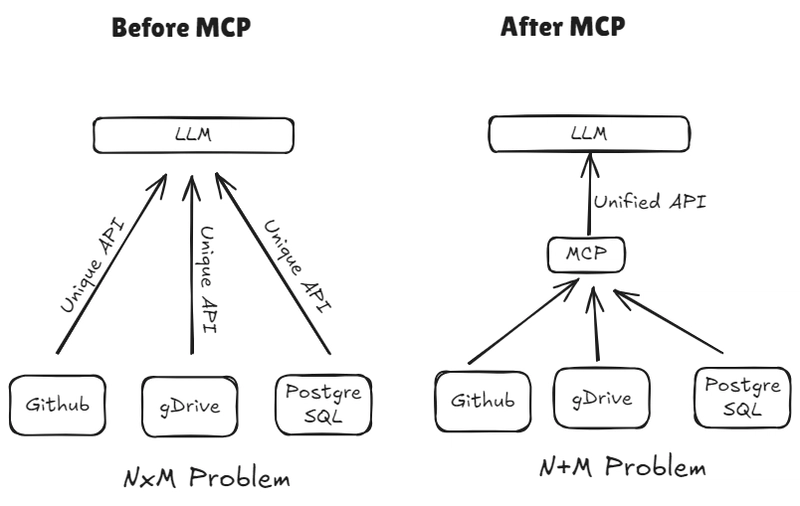
The Model Context Protocol (MCP) is an open standard that defines how large language models can connect to external tools, data sources, and services. Instead of building custom adapters every time, developers can expose capabilities through MCP servers and let models interact with them in a consistent way.
For developers, the impact is huge as MCP simplifies integration work and reduces boilerplate, making it easier to connect an LLM to APIs, local runtimes, or internal systems.
For applications, MCP expands what AI can actually do. A model that can only generate text is powerful but limited. Once it can run code, query APIs, fetch fresh data, or trigger workflows, it becomes an active part of your stack.
For end users, the impact of MCP shows up directly in the experience. It turns AI from a text generator into a problem solver. Instead of only giving you instructions, an AI application can actually take action on your behalf. The AI can interact with each existing tool and system: browser automation, expanded memory accessing your files and much more!
Under the hood, MCP is not magic: it is a communication protocol. The idea is that before the model is called with the user input, the client injects a list of available tools into the context.
Each tool is described in JSON: its name, the parameters it expects, and a short description of what it does. When the LLM generates a response, it can decide to call one of these tools by returning a JSON object that includes the tool name and the arguments it wants to pass.
The MCP client then takes that request, executes the tool on the MCP server, and returns the result back to the model. The model can then continue the conversation using the fresh output.
In practice this looks like a loop: define the tools, let the model pick one, run it, feed the result back, repeat.
An MCP server in 30 lines of code
Writing an MCP server in your favorite language is very easy thanks to official SDKs. If you’re working with a technology which doesn’t have an official SKD yet, there are a few developed by the community. In case there is nothing out there yet, you can implement your own MCP SDK from the official spec.
Writing a MCP server becomes very easy if you’re leveraging an SDK. You just need to define what you want to expose and start the server. In this example we will create an MCP server exposing a simple “Hello World” tool.
import{McpServer}from"@modelcontextprotocol/sdk/server/mcp.js";import{StdioServerTransport}from"@modelcontextprotocol/sdk/server/stdio.js";import{ z }from"zod";const server =newMcpServer({ name:"Hello World", version:"1.0.0", description:"Hello World server",});// The schema is important// To communicate the expected input to the LLMexportconst helloWorldSchema ={ name: z.string().describe("Name to include in the greeting"),};server.tool("hello-world","Say hello to the world", helloWorldSchema,async(params)=>{// Write here your business logicreturn{ content:[{ type:"text", text:`Hello World ${params.name}!`}],};});server.connect(newStdioServerTransport());
tsx
As we can see from the example, the SDK abstracts all the complexity of the protocol and allows us to just define the tools we want to expose. In less than 30 lines of code we have a working server that we can connect to an MCP client.
How and why we built the Node.js code sandbox MCP server
One of the most exciting use cases for the Model Context Protocol (MCP) is extending an LLM with a safe coding environment. Large language models are already good at generating code, especially self-contained scripts and small utilities. But the real power comes when you give them the ability to actually run that code and get the result back. That’s where our Node.js code sandbox comes in.
We built an MCP server that lets LLMs execute Node.js code inside isolated Docker containers. This setup allows code to run safely while giving the model a lot more flexibility. It can install npm dependencies on the fly, interact with the filesystem and much more The user can define a host folder, so that the model can interact with existing files (reading them privately, updating them and creating new artifacts), all on your local machine.
One big advantage of this setup is that the model can install its own dependencies when needed. Instead of being limited to a fixed runtime, it can pull in any library from the NPM ecosystem. With millions of packages available, the model can handle tasks like generating PDFs, creating charts, or scraping data using the right tool for each job.
So what does all of this actually unlock? In short: a playground where an LLM can not only write code but also run it, generate files, and return real outputs you can use. Here are some of the cooler examples we’ve seen:
Generate PDFs and reports: Imagine asking the model to create a JavaScript guide for kids and getting back a ready-to-share PDF.
Work with CSV and JSON: generate fake user data, convert between CSV and JSON, or filter and manipulate data files in place.
Do actual analysis: run math libraries like math.js to evaluate complex formulas to allow the LLM to do calculations reliably.
Build charts and visuals: spin up Chart.js inside the sandbox to create revenue graphs, usage dashboards, QR codes and much more.
Play with the web: fetch data from an API, scrape a webpage title, or even take a browser screenshot with Playwright.
The magic here is that these aren’t just code snippets: they’re actual running scripts, with results you can save, visualize, or feed into the next step of your workflow.
The challenges and options to run JS safely on your local machine
When you let an LLM generate JavaScript code, you have to treat that code as untrusted. Just like running code from the internet, it could contain unsafe operations or attempts to access things it should not. For this reason, running it directly in your user space is not a good idea. The key challenge is finding a safe way to execute the code while still keeping the setup practical.
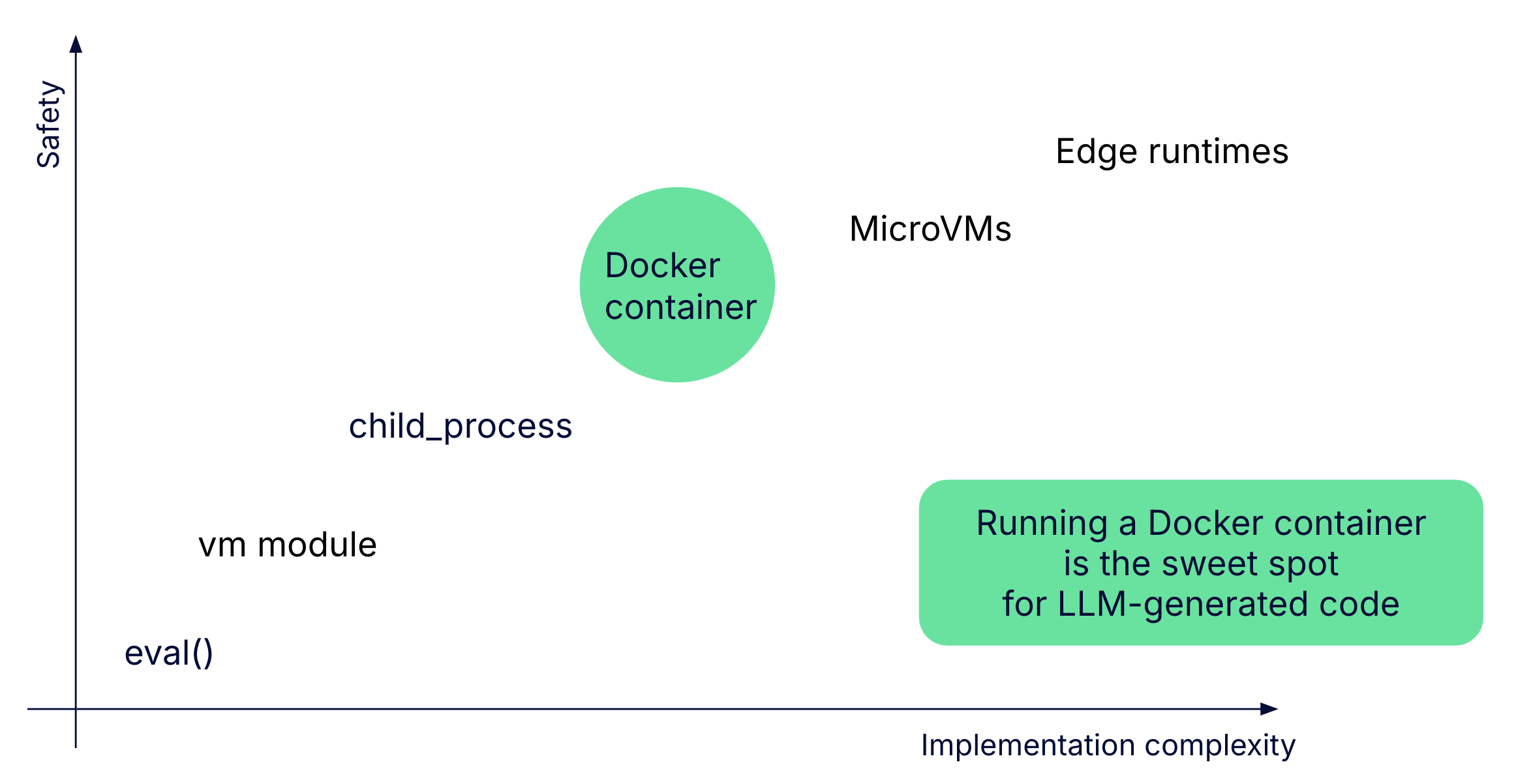
There are several options available in Node.js. At the most basic level, you could use eval() or the vm module, but both are unsafe because they share memory and context with your application. Moving up a bit, you can use child_process to isolate execution, but it still does not provide strong guarantees. At the other end of the spectrum, you can use microVMs or edge runtimes, which offer excellent isolation but add a lot of complexity to set up and manage.
The sweet spot sits in the middle: running the code inside a Docker container. Containers give you strong isolation from the host machine, while still being lightweight enough to spin up quickly and manage easily. You can also enforce strict CPU and memory limits, making it safer to execute arbitrary code. For this reason, we chose Docker as the foundation for the Node.js code sandbox MCP server. It provides the right balance between safety and implementation complexity.
A minimal implementation
To make things concrete, here is a stripped-down example of an MCP server that can run Node.js code inside a Docker container. It uses the official Model Context Protocol SDK for Typescript, and exposes a single tool called run_js_ephemeral.
The server is created with McpServer. We then register one tool, which takes a single parameter: the JavaScript code to execute. The parameter schema is defined with zod, so the server knows what inputs are valid.
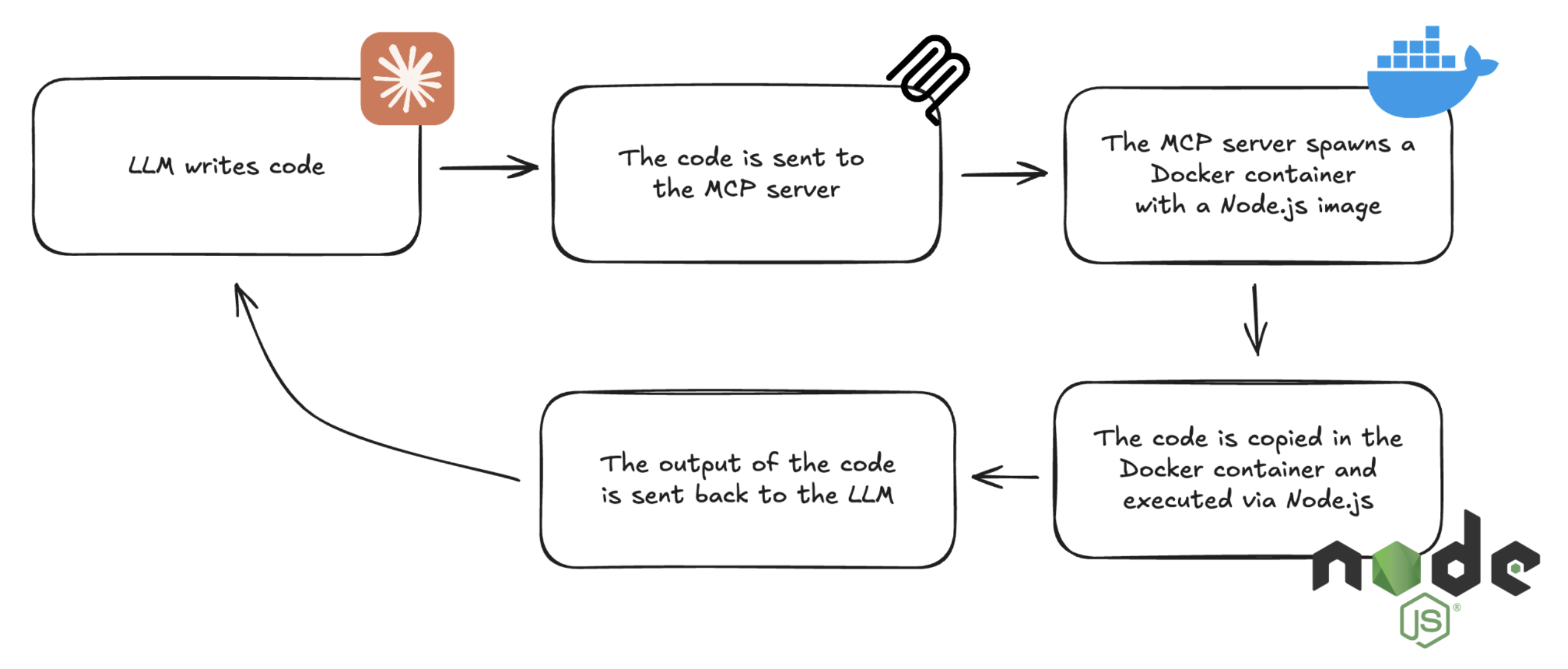
Inside the tool implementation, the flow is:
Create a new container – A fresh Docker container is started from the lightweight node:lts-slim image. Each run gets a random ID so containers don’t clash.
Copy code into the container – The user’s code is written to a temporary local folder and then copied into the container as index.js.
Execute the code – The container runs node index.js to execute the script. The stdout of this process is captured.
Clean up – The temporary folder is deleted and the container is removed, so every run is isolated and leaves no traces.
Finally, the output is returned to the MCP client in a JSON-compatible format, which means the LLM calling this tool will get back the program’s output as plain text.
import{McpServer}from"@modelcontextprotocol/sdk/server/mcp.js";import{StdioServerTransport}from"@modelcontextprotocol/sdk/server/stdio.js";import{ execFileSync }from"child_process";import{ randomUUID }from"crypto";import{ z }from"zod";importfsfrom"fs/promises";importpathfrom"path";importtmpfrom"tmp";const server =newMcpServer({ name:"Node.js Code Sandbox", version:"1.0.0", description:"Node.js Code Sandbox server",});server.tool("run_js_ephemeral","Run JavaScript code in a sandboxed environment",{ code: z.string().describe("JavaScript code to run")},async({ code })=>{const containerId =`js-ephemeral-${randomUUID()}`;// Create the containerexecFileSync("docker",["run","-d","--name", containerId,"node:lts-slim","tail","-f","/dev/null",]);// Create and copy the code to the containerconst localTmp = tmp.dirSync({ unsafeCleanup:true});await fs.writeFile(path.join(localTmp.name,"index.js"), code);execFileSync("docker",["cp",`${localTmp.name}/.`,`${containerId}:/`]);// Run the codeconst output =execFileSync("docker",["exec", containerId,"/bin/sh","-c","node index.js",]);// Cleanup localTmp.removeCallback();execFileSync("docker",["rm","-f", containerId]);return{ content:[{ type:"text", text:`Node.js process output:\n${output}`}],};});server.connect(newStdioServerTransport());
tsx
Expanding it with dependencies installation and access to filesystem
So far we looked at a minimal server that runs code in isolation, but to make the sandbox truly useful we need two more features: installing dependencies and interacting with the filesystem.
Installing dependencies
The good news is that this is straightforward. We extend the tool’s schema so that, besides the code string, it can also accept an array of dependencies, each with a name and version. When a new container is created, we write both the index.js file and a minimal package.json that lists those dependencies.
Then, before executing the script, the server runs npm install inside the container. This gives the model access to the full NPM ecosystem on demand. The sandbox can now pull in exactly what it needs at runtime.
Safe working directory access
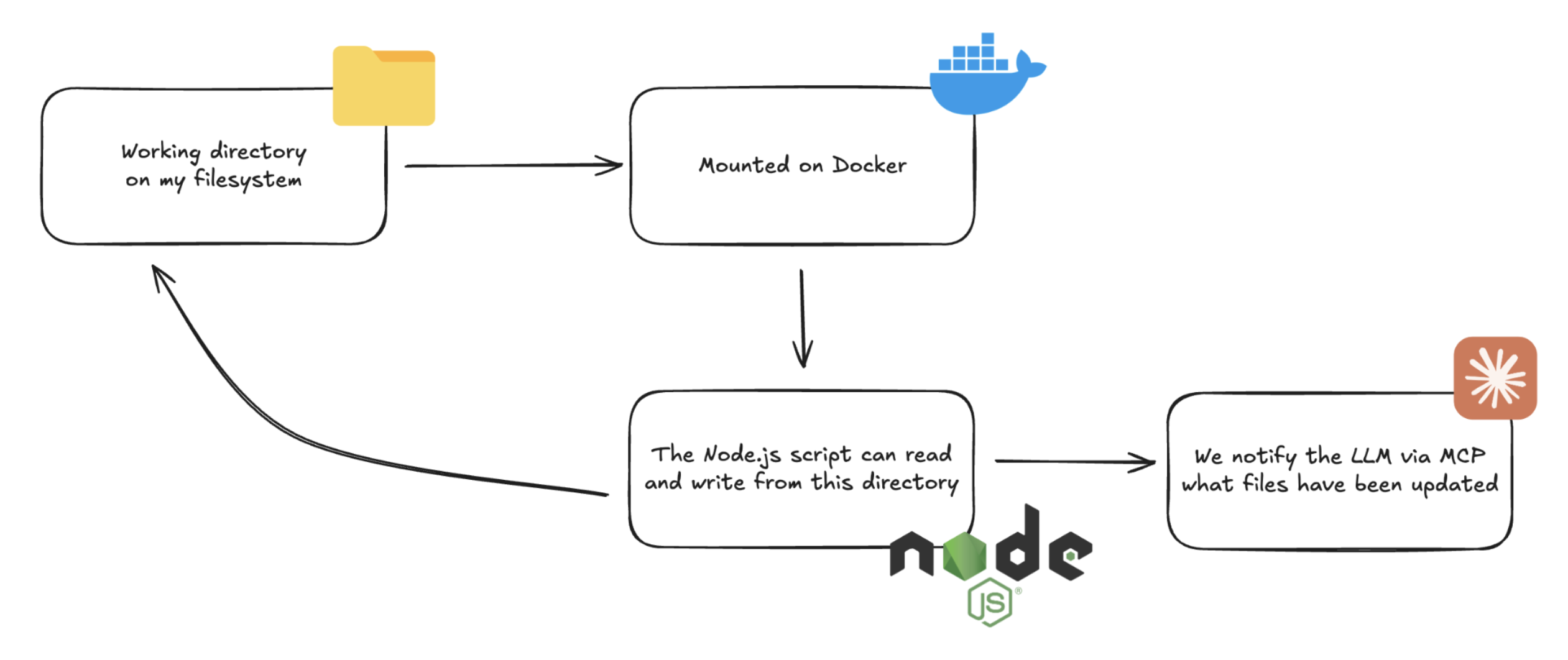
The second extension is file handling. By mounting a local working directory into the container, the Node.js script can read and write files as if it were running on your machine. The key is to make this directory explicit and controlled. Instead of hardcoding a path, we expose it as an environment variable in the MCP server configuration. This lets the user decide where outputs should go, while ensuring the sandbox cannot wander outside that boundary.
With MCP’s flexible return types, we can notify the LLM about any file changes that happened during execution. The response can include a list of added, deleted, or updated files. For images, we can return both a file reference and a base64-encoded preview so the model can show it directly. For other artifacts, we provide a URI pointing to the local file. This gives the LLM full visibility into what the script produced without exposing the entire filesystem.
The Takeaways for writing an MCP Server
These are our main takeaways from building MCP servers and, in particular, from creating the Node.js code sandbox. They reflect the lessons we learned along the way and the patterns that seem to matter most in practice.
One of the first insights is that prompt engineering still applies. Even though MCP looks like infrastructure, the way you design inputs and outputs has a big impact on the overall experience. Clear parameters, good naming, accurate descriptions, well-structured responses, and consistent error handling make the difference between a server that feels clunky and one that feels natural to use.
This becomes even more important with weaker models, where guidance is key to helping them choose the right tool in the right context. The way we approach this is by carefully writing the tool descriptions, outlining the intended use cases, and making sure the server communicates its purpose clearly.
Another key takeaway is security. MCP is not secure by default, and it’s important to treat it that way. Any input the server receives should be considered untrusted and carefully sanitized before execution. The risks are real: prompt injection, arbitrary command execution, and misuse of parameters can all lead to dangerous situations if not addressed.
There are already published advisories and examples of these pitfalls, such as the Node.js sandbox advisory and the “MCP horror stories” blog post series. Security has to be a first-class concern, especially when working with non-deterministic systems as LLM.
A good way to think about security in MCP is to assume that attackers will try to inject parameters and misuse your server. You should create unit tests that cover edge cases and malformed inputs, and validate that your server handles them safely. Following the principle of least privilege is also important: only give the server the minimum access it needs to do its job, and nothing more. This mindset helps keep the attack surface as small as possible.
Finally, there is the frontier of MCP. The ecosystem is moving quickly. We now have an official MCP registry, which makes discovering and sharing servers easier. Major platforms like ChatGPT are adding full MCP support, opening the door to broader adoption. This is still early days, but it’s clear that MCP is becoming a foundation for connecting LLMs to real tools and workflows.
Conclusion
At Nearform, we’ve been working with Node.js since 2012, and over the years we’ve built deep expertise around it. Today we’re combining that foundation with our work in AI and AI-powered applications, exploring how technologies like MCP can open up new possibilities. The Node.js sandbox MCP server is one example of how our experience in both worlds comes together.
But wait - there's more.
Nearform publishes real-world learnings on data & AI, engineering, and digital strategy - with more merged in weekly.
Insights
Perspectives on AI in engineering, product development, and strategy, for enterprise executives.