Exploring the options, trade-offs, and rough edges of running language models fully in the browser, across five web AI runtimes on desktop and mobile.
Your new AI platform is the browser
At Nearform, we build all manner of AI applications and solutions for our clients. While most folks think of AI models backing applications like these as solely the purview of the backend, like an API server routing to a cloud-based frontier model, there’s a whole emerging world of potential on the frontend, in the browser.
We’ve already written about how things like semantic (vector) search can be performant, private, and versatile in the browser, and this same innovation wave applies to AI models as well. Web browsers now have direct access to the GPU processing and memory needed for AI inference tasks thanks to WebGPU, an API standard gaining increasing support in modern browsers. AI models have also made enormous gains in reducing model size while improving inference quality.
This makes for an exciting time: we can run real AI inference in the browser, with plenty of options. And we do mean a lot of options. This area is so new and hot that there are a growing number of in-browser AI frameworks to choose from. So, we built a demo web application to see which ones actually hold up, running five of the most promising options side by side in a uniform chat, info, and configuration interface.
You can follow along, gory details and all, at https://nearform.github.io/web-ai-demo/ (with source available at https://github.com/nearform/web-ai-demo). Most of what follows — the tips, the tricks, and the stumbling blocks along the way — came out of getting five very different runtimes to answer the same question through the same interface. After the runtime tours, we’ll also get into two comparisons we found especially interesting: how the runtimes handled tool calling, and what happened when we put all five on an iPhone 15 Pro.
… but browser inference is pretty challenging
OK, so it’s both exciting … and hard. In-browser inference models have real constraints worth reviewing at a high level, as these concerns will thread throughout our tour of the various runtimes.
Context is really small. Consumers of frontier and open-weight models are used to context in the 250K to 1M token range. Many of the model setups we’ll tour here run from about 1K up to 9K total context. That’s tens to hundreds of times smaller and often barely enough to fit a reasonable system prompt, let alone domain-specific context information. Chrome’s Prompt API, for example, reported a contextWindow of 9,216 tokens on our test machine. Others (e.g., those supporting full Gemma 4) can be set to modern ranges of 128K–256K, though on our M5 Max, answers from the larger Gemma 4 models became garbled past about 32K. Browser models are mostly comparable to models from the 2022–2023 era of AI, which is to say behind today, yet a capable start. But this is changing quickly, with Gemma 4 signalling a new wave of models that are qualitatively much closer to modern frontier models.
The model downloads are large. To get a model on-device, you’re looking at a download of anywhere from roughly 180 MB up to a whopping 19 GB. That will noticeably impact the UI. Fortunately, all of our browser inference runtimes have a means of caching downloaded models. Additionally, there are open source cache libraries you can use now, as well as an early W3C WICG Cross-Origin Storage proposal that would let you download an AI model once in a browser and then make it available to all the different apps that might use it. Transformers.js, wllama, and WebLLM already support it. If you’re impatient, there are already multiple browser extensions that let you use it now!
Memory is limited, particularly on iOS. On a desktop browser, a runtime that streams the model in rather than loading it all at once can use close to the GPU’s full memory — our M5 Max ran every Gemma 4 model Google publishes for LiteRT-LM.js, up to the 19 GB 31B. Many recent Android phones have room for Gemma 4-class models too. iOS is the exception: it caps how much memory a browser tab can take, and since every iOS browser runs on WebKit, Chrome for iOS gets the same limit as Safari. Go over it and there’s no error to catch, as iOS just kills the tab.
The small models are, well, small. Some models fit within iOS’s limits, but they’re small: the ones that ran on our iPhone were all around 400 MB or smaller. At the current state of the art, it’s a real challenge to produce acceptable results for most real-world use cases. That means you’re going to get not just hallucinations, but often gibberish or nonsensical responses. You can limit the impact of this with better base context, but that pushes against the other problem of extremely limited context. The clearest example we saw is one model at two quantisations. Qwen3.5-0.8B at Q4_K_M (533 MB) answered coherently; the same model at Q2_K_XL (418 MB), right at the edge of what our iPhone could load, often produced gibberish responses and missed tool calls in our testing.
Everything is changing all the time. The AI technology ecosystem moves really fast. The web AI ecosystem, we’d argue, moves even faster. By the time this article is published and you read it, the capabilities, APIs, and limitations of much of what we’ll talk about will have changed — and potentially dramatically. For anything you end up trying out (and you should try this stuff out!), make sure to head over to the project docs first and check for updates on the latest advice on getting started.
More constraints will turn up as you go. We’ll cover a few more in this article and the demo, but just be aware that it’s a wild web AI world out there.
The five, and how we compared them
The five we built into the demo are the ones we found most compelling, and we’ll walk you through the most basic starting point for each, along with the comparison notes from running them side by side. Our examples all circle around fairly basic questions that a model should be able to answer out of the box, with no additional context, plus a simple follow-up — consider this the “hello world” of web AI. The online demo defaults to a one-shot “In one sentence, what is bikeshedding?”, which we’ll use as a running check on output quality at every stop. The code examples here take an easier, multi-turn “What does a web browser do?” question, for a slightly different flavour if you’re running all five yourself.
You can try the snippets on your own, or follow along in the demo app, which adds diagnostics, control levers, and supporting information about each runtime in various panes and drill-downs.
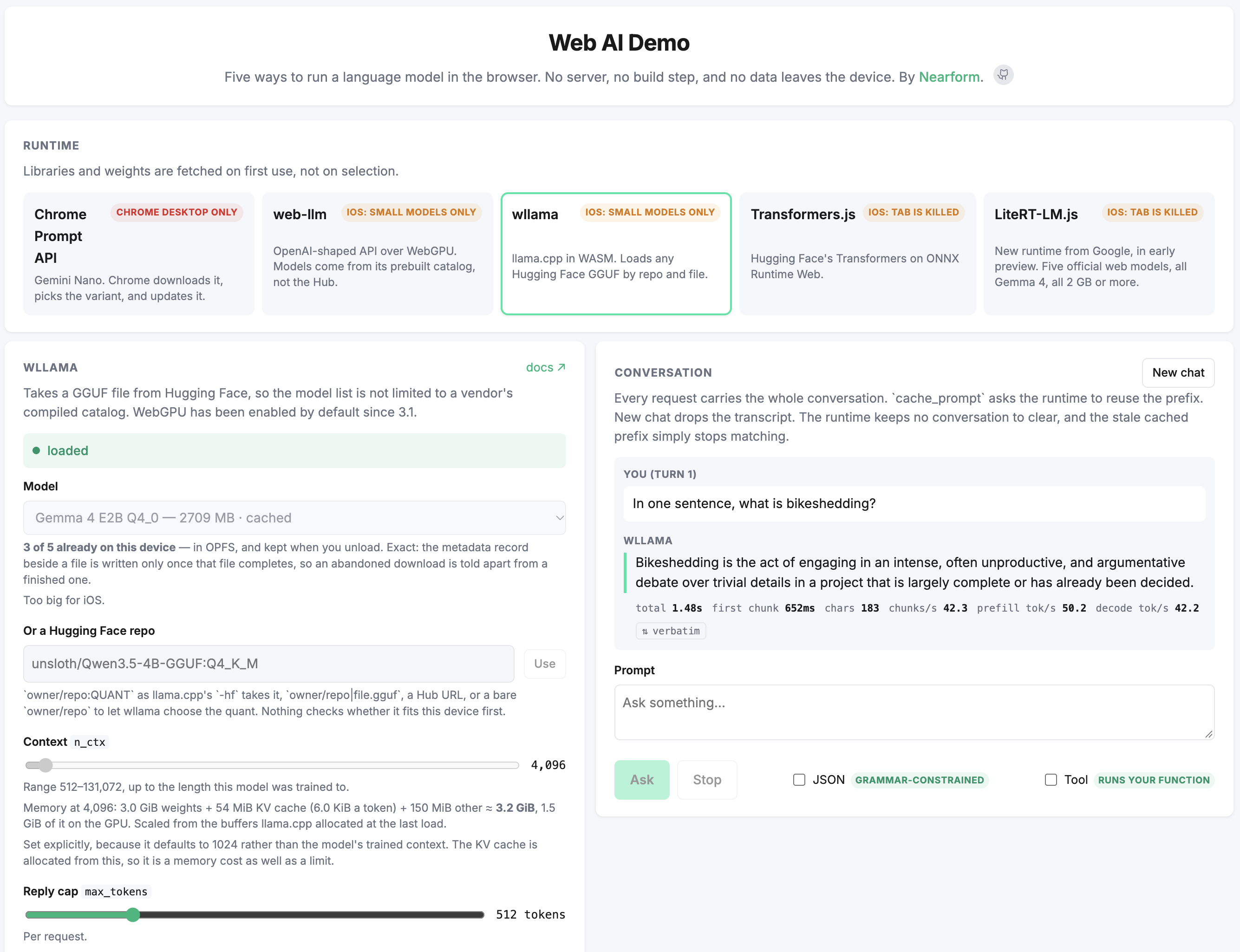
Demo app showing wllama runtime inference with Gemma 4 model.
And to lead in with the takeaways for all the runtimes, we’ll kick things off with a brief comparison table:
The web build of Google’s LiteRT-LM runtime (the same engine as on Android and iOS), taking over from MediaPipe’s LLM Inference API; loads -web.litertlm / -gpu.litertlm bundles
You want Gemma 4, from E2B up to 31B, tuned for GPU speed
That table says what each runtime is. The difference you’ll feel first is who owns the conversation. Two of the five — the Chrome Prompt API and LiteRT-LM.js — keep it themselves, so each turn is just a prompt, and both also take the system prompt at construction rather than per turn (so editing it mid-conversation does nothing). The other three — WebLLM, wllama, and Transformers.js — leave it to you: you manage the message array and resend it every turn. You’ll see that split in the differing ask() signatures in every snippet that follows. Another significant difference is tool calling, which we cover after the individual runtime tours.
Chrome Prompt API — promising, if you’re on Chrome
Our first runtime is already available in modern Chrome browsers, is part of an evolving W3C standard, and is heading towards broader browser and model support.
The Prompt API provides a conversational AI model using Gemini Nano that accepts multimodal inputs and generates text outputs. The size of the downloaded Gemini Nano model may vary by browser — you can find more info at the special chrome://on-device-internals URL in Chrome. It is also one of a family of task-specific AI APIs in Chrome, alongside the Translator, Summarizer, and Proofreader APIs.
Let’s see the minimum code you need to get up and running with the Prompt API:
if((awaitLanguageModel.availability())==="unavailable"){thrownewError("No built-in model on this device");}const session =awaitLanguageModel.create({initialPrompts:[{role:"system",content:"Answer in one sentence."}],});// The session keeps the history, so a turn is just a prompt.constask=async(prompt)=>{let output ="";forawait(const chunk of session.promptStreaming(prompt)){ output += chunk;}return output;};console.log(awaitask("What does a web browser do?"));console.log(awaitask("Now make it shorter."));session.destroy();
jsx
Pretty straightforward! We wrap the model call in ask() to standardise our example code across the five runtimes.
Head over to the live demo (in a modern Chrome browser) and try out the API and the various settings for yourself. On the bikeshedding question, we’ve seen typically good responses like:
Bikeshedding is debating trivial details that don't significantly impact the overall outcome or decision.
As we progress through our other runtimes, we’ll see that answering this correctly with essentially no context is a non-trivial bar. The current Gemini Nano model produces very good outputs. Although context is technically “dynamic”, we usually see 9,200+ tokens of available context, which is pretty spacious for the web AI environment. Being limited to Chrome (and Edge, in preview) at present limits where the runtime runs, but it has a caching advantage (at least until Cross-Origin Storage lands): once you enable and download an initial model, it’s available for all apps using the Prompt API. There’s a lot more on the roadmap for the Prompt and related APIs, and you can get a sneak peek by joining the Built-in AI: Early Preview Program.
Our takeaway for the Prompt API is that if you’re in a Chrome environment where it’s supported, and you’re OK with a proprietary Gemini model, then this is a solid API to build around. The future looks a bit more open, with the open-licensed Gemma 4 model landing behind a flag (chrome://flags/#gemma4-for-built-in-ai, see source) in Chrome Canary (v153+).
WebLLM — a curated catalogue on WebGPU
WebLLM is a long-standing (well, for this arena) project that runs MLC-compiled models with WebGPU support. It has a curated catalogue of known working models, which is good for predictability, though new models can take a while to arrive, and there’s a backlog of open model requests. Its newest released families are Gemma 3 and Qwen3.5, but some requests are moving: Gemma 4 support (text and audio) has landed on the main branch, with prebuilt catalogue entries due in the next release. You aren’t limited to the catalogue, though: you can compile your own models for architectures MLC already supports (now including Gemma 4 E2B) with the MLC LLM toolchain.
It also supports very small models that fit within iOS’s tight memory limits — one of only two runtimes we got an answer out of on our test iPhone without crashing, which we’ll come back to later. And while the models have reasonable inference speed, the catalogue’s default context is small — 1K, 2K, or 4K, chosen to save memory. You can raise it per model if the device has memory to spare (once we did, Qwen2.5-0.5B found a code we buried 16K tokens deep).
WebLLM provides a basic OpenAI-compatible API. Let’s see what hooking it up looks like for a multi-turn conversation.
import{CreateMLCEngine}from"https://cdn.jsdelivr.net/npm/@mlc-ai/web-llm@0.2.85/+esm";if(!(awaitnavigator.gpu?.requestAdapter())){thrownewError("web-llm needs WebGPU");}// Downloaded on first use, then cached in the browser.const engine =awaitCreateMLCEngine("SmolLM2-360M-Instruct-q4f16_1-MLC",{initProgressCallback:({ text })=>console.log(text),});// Stateless, OpenAI-style: resend the whole conversation each turn.// The engine reuses its KV cache, so only the new turn is prefilled.constask=async(messages)=>{let output ="";forawait(const chunk ofawait engine.chat.completions.create({ messages,stream:true,})){ output += chunk.choices[0]?.delta?.content ??"";}return output;};const messages =[{role:"system",content:"Answer in one sentence."},{role:"user",content:"What does a web browser do?"},];const first =awaitask(messages);console.log(first);// Turn two: keep our own history, then resend all of it.messages.push({role:"assistant",content: first });messages.push({role:"user",content:"Now make it shorter."});console.log(awaitask(messages));await engine.unload();
jsx
As with any runtime, output quality depends mostly on the model, and the small end of the catalogue struggles. You can see for yourself in our WebLLM demo. The smallest option, SmolLM2-135M-Instruct-q0f16-MLC, makes a good stress test: we put the bikeshedding question to it four separate times. It never got it right, and it was never wrong in the same way twice:
That's all, Millie.
Cloth-style bikeshedding is a style of pulling a bike onto a bike wheel, tagging the wheels with stains or fans to colour them, and rearranging them into a frame for a new bike.
Think about it: jumping forward from present things and caring about the future.
Is this enough information to answer the user's question?
The second response is arguably the only one that’s not pure nonsense or a non-answer. Oh, and we hope Millie’s doing OK.
Moving up the catalogue helps. The far larger Hermes-3-Llama-3.1-8B-q4f16_1-MLC gets it right, though it ignored “in one sentence” and went on for a full paragraph, plus a second <explanation> version:
Bikeshedding is the phenomenon of spending an inordinate amount of time discussing insignificant or trivial matters, often due to a preference for debating easily definable issues over more significant, complex problems.
WebLLM is a good option when you want a tested, pre-compiled catalogue behind an OpenAI-compatible API that runs in practically any WebGPU-capable browser. Pick the largest model your target devices can hold, and expect the smallest ones to need a lot of help.
wllama — llama.cpp, in the browser
In the open-weight model world, the llama.cpp project is a powerhouse. Hugging Face has an enormous array of modern, tuned options for GGUF, llama.cpp’s native format. At Nearform, we use it regularly for local-machine and traditional server-based inference. The wllama project brings the power of llama.cpp to the browser via WebAssembly with optional full WebGPU support.
While many web AI runtimes struggle with model selection and updates, wllama can run any GGUF that fits in your browser and machine. And conveniently, it can load GGUF models straight from Hugging Face.
Here’s the code to get started with wllama and a Hugging Face model.
import{Wllama}from"https://cdn.jsdelivr.net/npm/@wllama/wllama@3.6.1/esm/index.js";// We found we needed the WASM pointer for loading via ESM in a browser.const wllama =newWllama({default:"https://cdn.jsdelivr.net/npm/@wllama/wllama@3.6.1/src/wasm/wllama.wasm",});// Any GGUF (as long as it fits), straight off Hugging Face.await wllama.loadModelFromHF({repo:"LiquidAI/LFM2.5-350M-GGUF",file:"LFM2.5-350M-Q4_K_M.gguf"},{n_ctx:4096},);constask=async(messages)=>{let output ="";forawait(const chunk ofawait wllama.createChatCompletion({ messages,stream:true,cache_prompt:true,})){ output += chunk.choices?.[0]?.delta?.content ??"";}return output;};const messages =[{role:"system",content:"Answer in one sentence."},{role:"user",content:"What does a web browser do?"},];const first =awaitask(messages);console.log(first);messages.push({role:"assistant",content: first });messages.push({role:"user",content:"Now make it shorter."});console.log(awaitask(messages));await wllama.exit();
jsx
One tip if you’re loading wllama as an ES module: the constructor takes a map of WASM paths, and in v3 that key was renamed to default (ngxson/wllama#216; the README documents the new shape).
Output quality will mostly depend on the model you choose (recency, size, etc.), but the neat thing is that you can choose from so many on Hugging Face! If you head over to the demo, you’ll see a very small LFM model, various sizes of Qwen3.5 models, and a 2.7 GB Gemma 4 model. The LFM answer sounds plausible, but it’s not the correct definition:
Bikeshedding is the process of removing bicycles from the road for parking or reuse.
The Gemma 4 model, however, will usually answer the question correctly out of the box with no additional context:
Bikeshedding is the process of intensely debating and arguing over minor or trivial details in a complex technical topic, often without reaching a meaningful conclusion.
In short, wllama is a great choice for local inference if you’re looking to tap into the wide world of GGUF models. You’ll be able to keep up with all the new models and derivative quants as soon as they land on Hugging Face. It’s also the second of the two runtimes that ran on our iPhone 15 Pro in both iOS browsers without crashing. WebGPU support is fairly new, so it’s worth checking the release notes as it develops.
Transformers.js — the API you already know, in JavaScript
Where wllama gets you Hugging Face’s GGUF catalogue, Transformers.js gets you the ONNX one. The original Python Transformers library is a mainstay in the modern AI ecosystem, and Transformers.js brings that world over to the browser, with ONNX models on ONNX Runtime Web. onnx-community publishes ONNX builds of many new models quickly, and for the rest, Optimum can convert PyTorch and other models to ONNX. As with wllama, models can run on CPU or WebGPU in the browser.
Let’s take a look at our basic web browser query in code on Transformers.js:
import{ pipeline,TextStreamer,}from"https://cdn.jsdelivr.net/npm/@huggingface/transformers@4.3.0";const generator =awaitpipeline("text-generation","onnx-community/LFM2.5-350M-ONNX",{dtype:"q4",device:"gpu"innavigator?"webgpu":"wasm",},);// Streaming here is a TextStreamer you hand in, not a stream you iterate.constask=async(messages)=>{let output ="";awaitgenerator(messages,{max_new_tokens:512,streamer:newTextStreamer(generator.tokenizer,{skip_prompt:true,// without it, the prompt is streamed back at you firstskip_special_tokens:true,callback_function:(text)=>{ output += text;},}),});return output;};const messages =[{role:"system",content:"Answer in one sentence."},{role:"user",content:"What does a web browser do?"},];const first =awaitask(messages);console.log(first);messages.push({role:"assistant",content: first });messages.push({role:"user",content:"Now make it shorter."});console.log(awaitask(messages));await generator.dispose();
jsx
In terms of output quality, the answers for LFM2.5-350M are in the same plausible-but-incorrect ballpark as for the same model on wllama, which you can try out on the demo page:
Bikeshedding is the process of removing old or damaged bikes from a storage shed.
(The Gemma 4 answer should be similar to the wllama one, and correct.)
On our iPhone 15 Pro, Transformers.js loaded and answered in both iOS browsers, and then iOS killed the tab moments later — we’ll get into that below. We suspect iOS’s per-tab memory cap rather than Transformers.js itself, since the model had already answered, but without an Android run we can’t say for sure. If iOS is on your list, test there early.
Overall, the factors that favour Transformers.js include its relative maturity, strong basis in the original Transformers ecosystem, and pretty wide availability of ONNX models. It’s a good choice if you already live in the Transformers ecosystem.
LiteRT-LM.js — strong new entrant, limited models
Our runtime list started with Google’s Prompt API, and we’ll conclude with our newest entrant, also from Google: LiteRT-LM.js. Google originally introduced TensorFlow Lite as a high-performance runtime for on-device AI in November 2017. It has since been upgraded to LiteRT, and LiteRT-LM is the orchestration layer that handles the LLM-specific work (tokenisation, KV cache, sampling, conversation state) on Android, iOS, and desktop. LiteRT-LM.js is that same LiteRT-LM engine compiled to WebAssembly and WebGPU, with a JavaScript API for browsers, running custom -web.litertlm / -gpu.litertlm models, and it’s where Google’s web LLM work now lives: the MediaPipe LLM Inference API that came before it is in maintenance-only mode. (Adding to the naming fun, Google also recently launched LiteRT.js, the web build of the core LiteRT runtime. It runs individual .tflite models — vision, audio, embeddings and the like — and leaves LLM generation to LiteRT-LM.js. They’re sibling packages from the same stack (@litertjs/core and @litert-lm/core), and we won’t cover LiteRT.js in this article.)
With all that nomenclature out of the way, let’s get into the inference details. LiteRT-LM.js pairs a modern API with models that offer larger usable context, strong inference performance, and tool calling support, all tuned to perform well in web browsers. Let’s see our working example here:
import{Engine,Backend,}from"https://cdn.jsdelivr.net/npm/@litert-lm/core@0.17.1/+esm";// 2 GB. Big! Probably challenging on older phones.const res =awaitfetch("https://huggingface.co/litert-community/gemma-4-E2B-it-litert-lm/resolve/main/gemma-4-E2B-it-web.litertlm",);const engine =awaitEngine.create({model: res.body,// streamed in, not bufferedbackend:Backend.GPU_ARTISAN,mainExecutorSettings:{maxNumTokens:2048},});// Like Chrome, the system prompt is baked in at construction — not per turn.const conversation =await engine.createConversation({sessionConfig:{maxOutputTokens:512},preface:{messages:[{role:"system",content:"Answer in one sentence."}],},prefillPrefaceOnInit:true,});// Safari cannot async-iterate a ReadableStream, so read it explicitly.// `for await (const chunk of stream)` throws there.constask=async(prompt)=>{const reader = conversation.sendMessageStreaming(prompt).getReader();let output ="";for(;;){const{ done, value }=await reader.read();if(done)break;const c = value?.content;// string | ContentPart[] — both shapes turn up output +=typeof c ==="string"? c :(c?.[0]?.text ??"");}return output;};// The Conversation holds the history, so turn two is just another prompt.console.log(awaitask("What does a web browser do?"));console.log(awaitask("Now make it shorter."));
jsx
LiteRT-LM.js runs inference quickly in our loose, anecdotal experience building these demos (Gemma 4 E2B decodes at around 75 tokens/sec on our M5 Max). And the API surface is good as well. On our bikeshedding question, the Gemma 4 model in the demo gives us a correct answer:
Bikeshedding is the act of arguing over trivial details or minor aspects of a topic, often to distract from the main issue.
It’s also the roomiest of the five by a wide margin. With maxNumTokens raised to 131,072, Gemma 4 E2B found a four-digit code we buried in a 125K-token prompt, though prefill took over a minute to get there.
Really, the biggest limitation with LiteRT-LM.js right now is the available models. So far, Google has published five Gemma 4 models in the -web.litertlm format — E2B, E4B, 12B, 26B A4B, and 31B — in its Web LLM Models collection on Hugging Face. (Note that the newer naming convention is the -gpu.litertlm suffix, so search for those too.) Community conversions are hit or miss: the one we tried, a -web.litertlm build of MiniCPM5-1B, fails to load on the default GPU backend (it does load on the CPU backend, much more slowly). Hopefully Google and the community release more usable models soon! And the official ones are not small: gemma-4-E2B-it-web.litertlm is the smallest at 2 GB, and the 31B is about 19 GB. Google’s engineers say E2B needs around 4 GB of free RAM in the browser.
It’s early days here, but if you’re betting on where Google is heading, and can start at 2 GB while smaller models arrive, LiteRT-LM.js looks like a good investment as it continues to develop.
What “tool calling” actually means, across the five
Tool calling is a fundamental part of modern models, and it’s useful in web AI to help with limited context (let the tool do something outside the model). All five take a tools option, so we declared the same one-function tool on each to see what actually happened — and “supports tool calling” turned out to mean three quite different amounts of work:
Runtime
Tool calling
What you write
LiteRT-LM.js
Yes
Nothing — it runs your function and returns the answer
wllama
Yes
Run the function, send the result back
WebLLM
Only on five Hermes models, 7B–8B
Run the function, send the result back
Transformers.js
Yes, if the model’s template has it
Parse the call out of the reply text, then the above
Run the function, send the result back (unless flagged)
For Chrome, tool use needs the chrome://flags/#prompt-api-tool-use flag, and the flagged version has your code run the tool (see Chrome’s tool use demo). Our demo targets the spec’s other shape, where the browser calls your execute(), so its Tool checkbox doesn’t reach your function in Chrome yet.
The demo’s Tool checkbox takes a JavaScript function you write and runs it against whichever runtime is loaded, so you can see which of these three behaviours you’re dealing with. Note that we didn’t add the extra code the demo would need to manually handle the Transformers.js chat template scheme to get parameters, call the function, and inject the result back into inference.
On an iPhone: two of the five worked, and the other three failed differently
All of the outputs so far in this article came off a laptop, a M5 Max with lots of GPU and unified RAM. The browser environment is about as strong as you’ll have right now for web AI. And a laptop/desktop with even 8 GB and an older graphics card can likely run all the demos here. But turning all of the same demo scenarios over to an older iPhone 15 Pro, for both Safari and Chrome for iOS, gave us the other end of the spectrum, with iOS’s tight memory limits and lots of crashes. It’s the one phone we had to test on, so read what follows as one iPhone’s results, not every phone’s.
Here’s a quick summary of the demo run on the iPhone 15 Pro with a small model on each runtime:
Runtime
Safari
Chrome for iOS
Chrome Prompt API
Unavailable
Unavailable
WebLLM
Runs
Runs
wllama
Runs
Runs
Transformers.js
Answers, then tab dies
Answers, then tab dies
LiteRT-LM.js
Tab dies
Tab dies
As you can see, three of the five completed a response to the bikeshedding query — one opening turn each, with no multi-turn follow-up — and only two survived. For just a few anecdotes on this particular phone, in normal mode we saw decode numbers of 40–45 tokens/sec on WebLLM for SmolLM2-135M and 30–34 tokens/sec on wllama for LFM2.5-350M (different models, so not a head-to-head). When we switched to low-power mode, the same runs gave us 30 tokens/sec and 10 tokens/sec. So power mode matters! The output quality was consistent with the desktop answers: SmolLM2-135M produces nonsense, and LFM2.5-350M answers plausibly, but incorrectly.
On the failure side, the Prompt API reports itself unavailable before you commit to a download, which is a nice, early failure. Transformers.js is the most surprising: on both iOS browsers it loads LFM2.5-350M, answers the question (with the same plausible-but-wrong definition as on desktop), renders the reply — and then iOS kills the tab a few seconds later while it sits idle, with the answer still on screen. LiteRT-LM.js takes the tab down with it on both browsers during the model load, so it doesn’t run on our iPhone at all. Android is another story: a Google engineer runs Gemma 4 E2B on a Pixel 9, and another runs E2B and E4B nicely on a three-generations-old Pixel 7 Pro. On iOS, though, the smallest Gemma 4 build is 2 GB, and nothing over about 400 MB held up on our iPhone.
These crashes come from iOS rather than from the web platform. iOS limits how much memory a single browser tab can take, and since every iOS browser is built on WebKit, Safari and Chrome for iOS run into the same limit. The hardware itself looks up to the job (Transformers.js had already answered before the tab went).
So, all in all, you have some options for web AI on iOS browsers, but it’s very, very challenging to run something that produces good output there right now. On Android, Gemma 4-class models already run, and as phones improve and iOS’s limits (hopefully) loosen, in a few years there may not be a noticeable difference from desktop at all!
Getting started when nothing is settled yet
Which runtime is right depends mostly on what you’re targeting. As our iPhone runs above show, the same code can run fine, throw, or kill the tab depending on the device and the browser. This area is so new and under such intense development that there’s no single right answer for getting started with web AI runtimes in your application. All five are still experimental, so it’s more about figuring out the relative strengths and capabilities that match your application use cases, and tracking the evolution of runtimes that have caught your eye. In the meantime, here are some navigational tips and tricks from our experiences in the trenches:
Pick your devices and browsers first: All the AI runtimes we toured today will fit on a modern laptop/desktop browser. Many will not be practical on an Apple mobile phone, although Android should work assuming sufficient VRAM. So limit your list early to the runtimes with models that will fit and perform on every browser you intend to support, not every platform.
Reach for many small models, not one big one: Given the operational constraints, you’ll often want to build AI apps and agents around many domain-specific models instead of a single all-purpose model, as you typically see in a traditional AI backend application. This lets your apps use the latest AI features while still fitting within a browser’s limited memory and GPU. Chrome’s task-specific APIs are one example, but the principle holds across every runtime here.
Use high-powered evals: This goes for both your experimentation and implementation phases. Web AI runtimes support such limited context that you’ll want to capture and iterate on the results all the time (our guide to building evals covers the how), as fixing one inference result may worsen another. And for your outside experiment and project harness, you’re no longer constrained to web models — go hook up a massive frontier model to run your evals and guide your iteration on how much you can get out of your web AI inference setup.
Log and observe everything: Web AI is often beset with crashes, weird behaviour, and more, so it’s a good idea to start logging and observing everything you can while building and experimenting. The diagnostics pane in our demo exists for this reason — it’s how we pinned down when the iOS tab kills happened: during weight loading, mid-output, and after the answer was already on screen. (iOS gives you very little to debug a dead tab with, so we also wrote crashbox, a small recorder that survives the tab kill and reports what it saw on the next load.) Capture the device conditions next to the numbers, as we noticed things like low-power mode impacting token speed.
It’s a brave new web out there
As we’ve seen from our tour of these runtimes, web AI is an exciting, challenging, and powerful area to build in. Right now, the runtimes and models may not yet be ready for your specific use case — the context is small, the downloads are big, and iPhones are a real stretch — but we expect web AI’s relevance to only increase in the years to come. The compelling advantages of on-device privacy, offline inference capability, inference cost, and more will come within reach as small models improve and web AI runtimes become more powerful.
At Nearform, we don’t see this as a backend or frontend question: the frontend is becoming a real target for at least some portion of the AI stack, alongside and mixed in with traditional backends. Think of it perhaps as the next wave of progressive enhancement. If your team is weighing what could run in the browser today and what should stay on the backend, please reach out.
So, we encourage you to poke around all the runtimes in the demo and the source code, and go try out some web AI on your own. See what tasks you can push to the browser (and open an issue for anything that breaks unexpectedly on your device), and have fun!
Many thanks to everyone who reviewed this piece and corrected our technical details: Jason Mayes, Tyler Mullen, Chintan Parikh, Matthew Soulanille, and Thomas Steiner at Google, Akaash Parthasarathy from the WebLLM project, and Reese Levine from the wllama project. Any remaining errors are ours.
But wait - there's more.
Nearform publishes real-world learnings on data & AI, engineering, and digital strategy - with more merged in weekly.
Insights
Perspectives on AI in engineering, product development, and strategy, for enterprise executives.


 Demo app showing wllama runtime inference with Gemma 4 model.