WebMCP is an emerging standard that turns frontend web apps into agentic tools. We explore how it works across various websites and integrations with a multi-agent research system.
The way we think about web pages is shifting. Frontend web applications were designed for humans with buttons, layouts, and forms. Now, AI agents are not just scouring web apps for content and answers; they are also attempting to interact directly with these apps on behalf of traditional users. Rachel Lee Nabors articulates a general vision of this future in their provocative talk describing the “Death of the Browser.“
Much work has focused on connecting backend systems to AI agents via protocols such as A2A (Agent-to-Agent), MCP (Model Context Protocol), and ACP (Agent Communication Protocol). Now the focus is turning to web applications: unlocking the built-in authentication, personalization, and user functionality that already lives in these apps. A good website user experience is evaporating as a digital moat; we’ll soon see a good agent experience as the critical need and differentiator. The challenge is finding the easiest way to bring this existing power to agents.
In this article, we’ll look at a new and rising standard: WebMCP. We’ll see how far it can take us in turning frontend-only web applications into powerful agentic tools. To illustrate this, we’ll start with an existing browser-based search tool we built at Nearform, then progressively layer on WebMCP and on-device AI agents.
Our starting point: browser-based vector search
We’ve been interested in the rising wave of AI capabilities in the browser at Nearform. In February, we wrote an article on vector search in the browser that could perform a similarity search across all of Nearform’s technology and case study content. We accomplished this with a combination of a pure JavaScript search engine and local embedding models, yielding pretty impressive results, including near-instant search results with an offline-capable service. But there’s a lot more to modern AI than just vector search. Other AI technologies that have become standard on the backend, such as language models and MCP tools, are only now starting to take shape on the frontend.
Our vector search feature is nifty but currently limited to a form-based web app. Under the hood, it’s just some JavaScript functions. What if we could expose those functions directly to AI agents in a natively friendly format? That’s what WebMCP enables.
How WebMCP works
WebMCP is an emerging standard that essentially allows web pages to be turned into an equivalent of Model Context Protocol (MCP) servers. The W3C Web Machine Learning Community Group leads the specification, with development championed by engineers at Google and Microsoft. In even the short time since the standard’s creation, it’s already seen a number of changes as the steering group iterates on practical, workable solutions.
At its core, WebMCP is a way for web applications to expose functionality in frontend JavaScript via MCP-like tools, so that agents can have understandable, schema-based, predictable interfaces to interact with a web app, while preserving the human interactive elements. It aims to fill a gap between existing MCP servers, which are backend-only, and frontend web automation (Chrome DevTools, Playwright, etc.) that controls a browser via a human-based UI. For a good introduction into when and why to reach for WebMCP, we suggest the Chrome team’s excellent post “When to use WebMCP and MCP.”
WebMCP works with both pure frontend applications, as we’ll discuss today, and traditional remote-backed web apps. For example, an e-commerce web application could expose everything from searchProducts to addToCart to checkout so that an agent (possibly even in combination with a human) could more quickly and easily navigate product discovery and purchase. Jack Herrington even has a quick demo video of him using a traditional chat tool to hypothetically order a sandwich from his browser.
These tools get the web applications’ logged-in auth and context, which allows powerful agent capabilities while piggybacking on the difficult things of authentication and personalization that a backend MCP tool would have more challenges with. To see the potential here, consider a company with extensive custom knowledge scattered across intranets and internal apps. (This was one of the original motivators of the MCP-B project.) Exposing and aggregating that functionality via WebMCP tools could be a faster, more direct path than writing dedicated MCP servers that require additional auth and access controls, as well as new backends.
Registering WebMCP tools
Getting started is pretty straightforward. A web application can share tools with navigator.modelContext.registerTool().
⚠️Browser requirements: If our demo apps don’t detect native WebMCP support, the functionality is automatically polyfilled. If you want true native WebMCP, you need Chrome 146+ and then set chrome://flags/#enable-webmcp-testing to Enabled.
The vector search functionality we’re interested in already exists as a searchPosts function (source). You can see the existing demo to get a sense of what’s available at nearform.github.io/vector-search-web. We pretty much just create an MCP-style schema around the searchPosts function with something like the following, and we have our first WebMCP tool:
navigator.modelContext.registerTool({name:"search_nearform_knowledge",description:"Vector search across Nearform blog posts and case studies using semantic similarity. Returns matching posts with titles, URLs, dates, and similarity scores.",inputSchema:{type:"object",properties:{query:{type:"string",description:"Search query (e.g. 'microservices architecture')",},postType:{type:"array",items:{type:"string",enum:POST_TYPE_VALUES},description:`Filter by type: ${POST_TYPE_VALUES.join(", ")}. [..]`,},minDate:{type:"string",description:"Only posts after this date, YYYY-MM-DD (optional)",},categoryPrimary:{type:"array",items:{type:"string",enum:CATEGORIES_LIST},description:`Filter by category: ${CATEGORIES_LIST.join(", ")} (optional)`,},maxChunks:{type:"number",description:"Maximum number of chunks to return (default 50, max 50)",},},required:["query"],},annotations:{readOnlyHint:true},execute:async(args)=>{const payload =/* SNIPPED - call and pass through searchPosts(args) */;return{content:[{type:"text",text:JSON.stringify(payload,null,2)}],};},});
jsx
Testing WebMCP tools from the console
If you’re Chrome DevTools-savvy, you can start working with the tool straight from the dev console. We additionally use the navigator.modelContextTesting built-in provided by Chrome’s WebMCP implementation, along with the WebMCP polyfills we put in our demo apps. It’s a nice tool for testing and debugging, especially since there aren’t many real WebMCP tool callers out there yet. You can navigate to nearform.github.io/vector-search-web, fire up the console, and you should be able to:
// Find our search toolnavigator.modelContextTesting.listTools().map((t)=> t.name)// => ['search_nearform_knowledge']// Find recent React Native posts.const result =awaitnavigator.modelContextTesting.executeTool("search_nearform_knowledge",JSON.stringify({query:"React Native",minDate:"2025-01-01"}))// Yes, that's double deserialization.const data =JSON.parse(JSON.parse(result)?.content?.[0]?.text ??"{}");console.log(JSON.stringify({numPosts: data.posts?.length ??0,numChunks: data.chunks?.length ??0,posts: data.posts?.map(({ title })=> title),},null,2))// => // {// "numPosts": 24,// "numChunks": 24,// "posts": [// "Accessibility made even easier: Introducing Nearform’s new modular, Expo-ready React Native AMA",// "How Nearform makes mobile better for global enterprises",// "Disrupting the fast casual industry",// /* ... */// ]// }
jsx
Discovering and calling WebMCP tools from Claude Desktop with MCP-B
While WebMCP tool registration and management are part of the standard and are already available in browsers like Chrome, remote discovery and calling are entirely different stories at this point. There are no browser- or tool-native consumers of WebMCP yet, aside from the navigator.modelContextTesting helper we just saw in Chrome in the previous section.
That said, there are several useful intermediate tools and libraries. Perhaps the most useful project stepping into this consumer gap is MCP-B. Originally started before WebMCP, MCP-B provides many useful transports and bridges to enable WebMCP across various application scenarios.
The first transport we’ll discuss is @mcp-b/webmcp-local-relay. In a web application, after your WebMCP tool registration, you can add a pre-packaged snippet as follows:
The snippet embeds an iframe that listens via websockets and relays WebMCP communication to a separate socket server.
Once this is configured, you can use the @mcp-b/webmcp-local-relay MCP server for discovery and calling. Any WebMCP tool in open browser apps with the embedded iframe snippet will be available. For example, as a Claude Desktop user, add this snippet to your mcpServers configuration:
With this, any discovered WebMCP tools will be available alongside any other MCP tools in Claude Desktop.
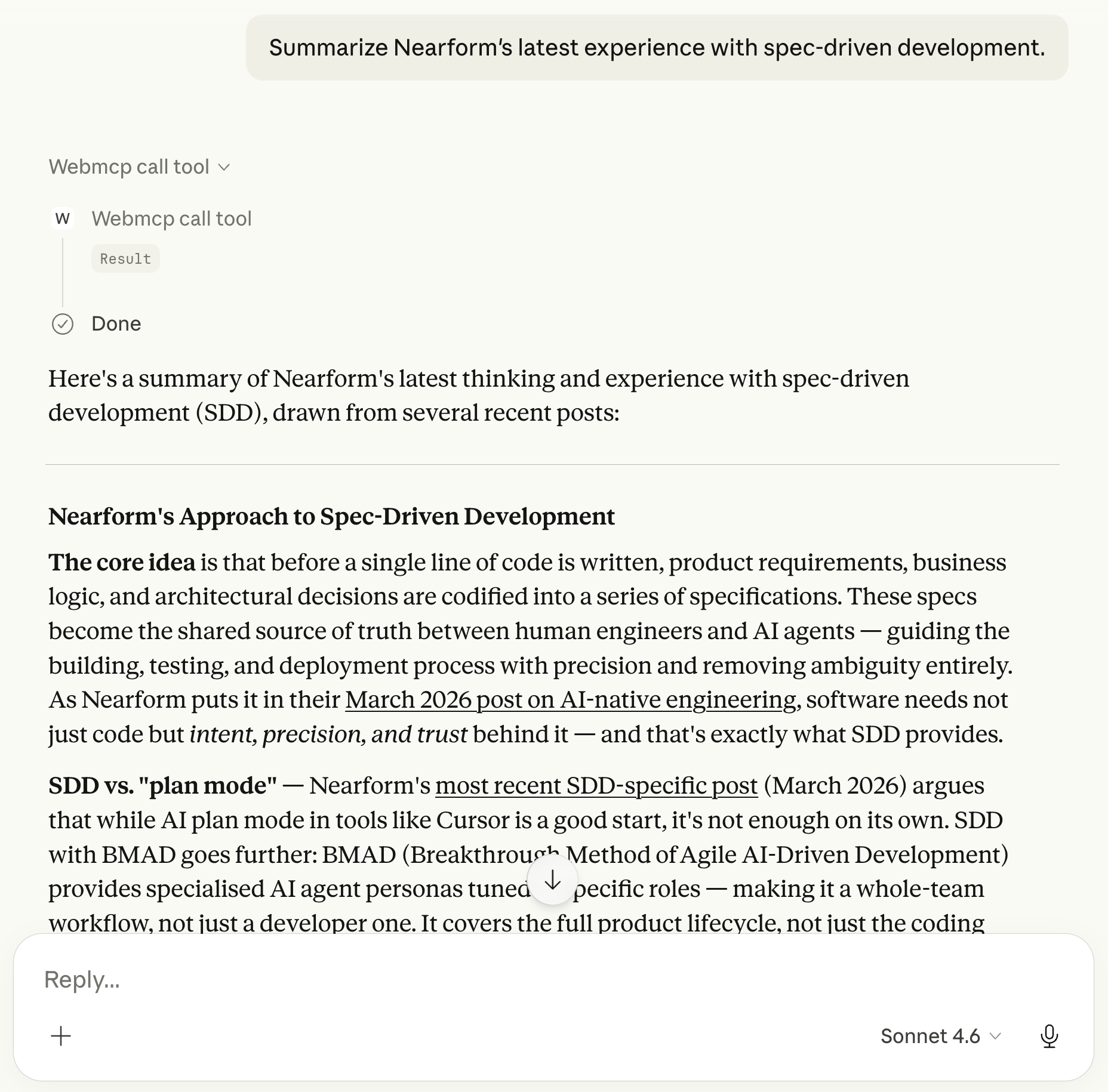
In the following example, we can see that webmcp-local-relay is using the search_nearform_knowledge tool from https://nearform.github.io/vector-search-web/ (open in a separate local browser window). For Claude Desktop users, we can click into the Result bubble to see the full tool call inputs and outputs. We get the full power of Claude chat models with our very localized WebMCP tools, contributing context.
The setup here is really useful: just configure @mcp-b/webmcp-local-relay once in Claude Desktop, then open any number of WebMCP-enabled web applications in a local browser and call their respective tools. This reduces the number of separate MCP tool configurations needed and addresses concerns such as authentication and personalization by using whatever an existing web application already uses and is willing to expose via WebMCP tools.
At this point, we’ve seen WebMCP tools called from the browser console and from Claude Desktop, both of which rely on external AI. But what if the AI itself also ran in the browser? Let’s push this web AI thing a bit further and build a full multi-agent system where all the functionality lives on-device.
Web Agents: Nearform research agents, all in a browser application
Looking at the pieces we already have: an in-browser vector search feature and a WebMCP tool to call it or any other JavaScript code, let’s see how far we can go with this to do a full research application, purely in the browser. And before we get started, it’s worth being clear here: WebMCP is remarkably useful in traditional web applications with backends. We’re going purely frontend for this demo to stress-test how far on-device AI can go today.
⚠️ Browser requirements: Chrome browser at version 138 or higher. You must set the following two developer flags to Enabled: chrome://flags/#optimization-guide-on-device-model and chrome://flags/#prompt-api-for-gemini-nano-multimodal-input, and then relaunch Chrome.
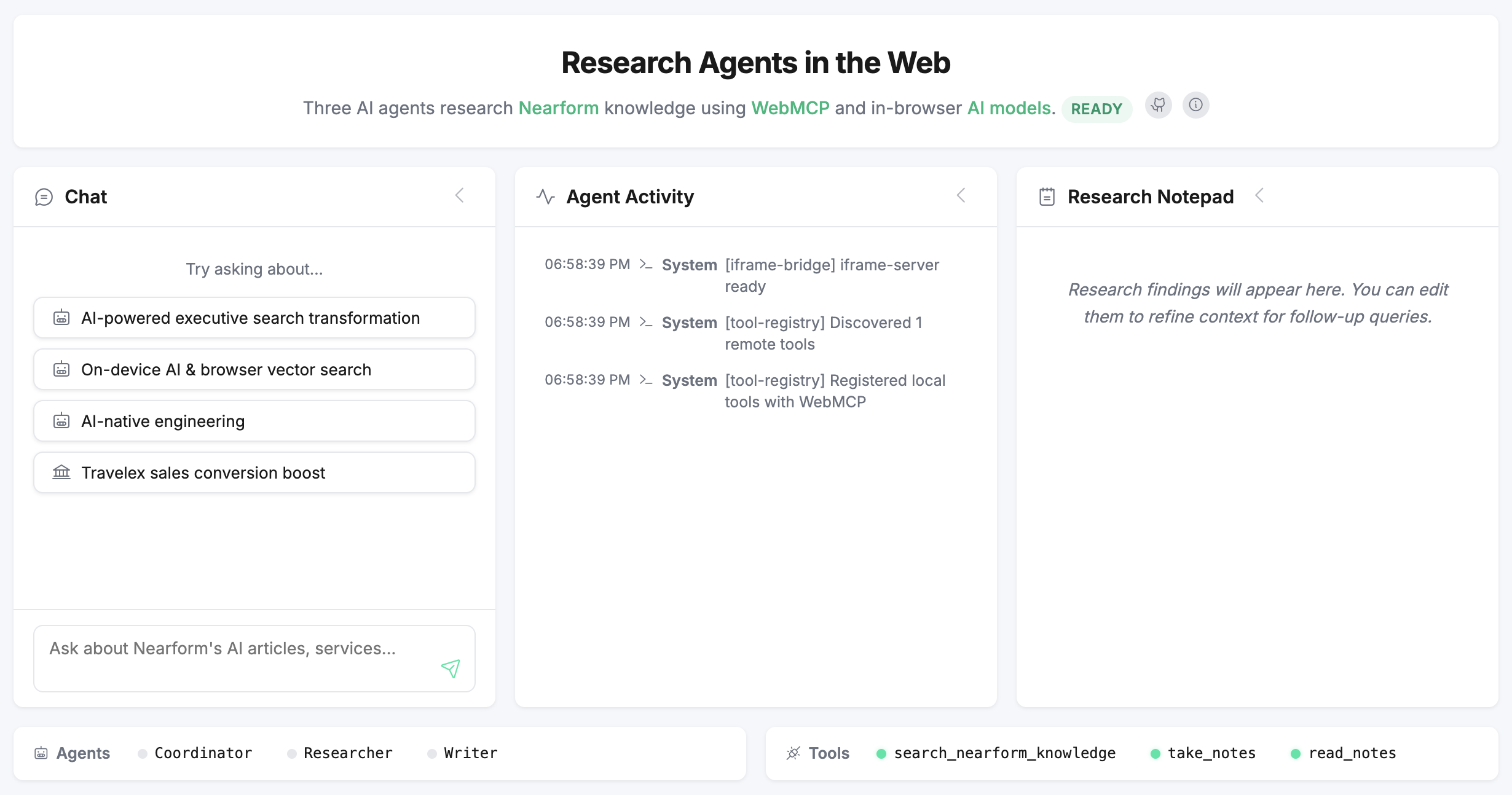
Assuming you’ve got a workable browser situation, here’s what the research assistant looks like:
Type a query in the chat pane, and you’ll get an answer! But there are a few caveats, the biggest one being that the Chrome Prompt API on most machines is going to be very slow compared to any of the normal chat applications you’re used to.
We’ll dig into more details later, but the overall workflow from start to finish looks like this:
On page load, the application discovers and registers local and remote WebMCP tools, notably the search_nearform_knowledge tool provided by https://nearform.github.io/vector-search-web/.
A user types a chat query, e.g., “What is Nearform’s experience with AI-native engineering?” The user should go grab a coffee now, because it’s going to be a while before we get a response.
The Coordinator agent takes the query and checks whether there is existing research to use. Finding none, it dispatches the Researcher agent.
The Researcher agent enters a research loop and calls the search_nearform_knowledge tool to find sufficient information for the query. Once it has research context, it returns a research brief (text) to the Coordinator.
The Coordinator then dispatches the Writer agent to create a research summary entry in the Research Notepad.
The Writer then uses the Research Notepad context to write an answer to the original user query and hands it off to the Coordinator to enter as a UI response in the Chat pane.
After an initial chat, the user can manually edit the Research Notepad to change the research context and ask follow-up questions. At each stage, the Coordinator agent will decide whether new research is needed or whether to skip straight to chat answers. For those curious, the Agent Activity pane records all the agent actions happening under the hood, and you can click into most entries to see the prompts, tool call responses, and information about each step along the way.
For that initial sample query above, we got the following answer in a test run:
Nearform has deep experience with AI-native engineering, viewing it as a transformative approach to software development. They are building an AI-native stack focused on spec-driven development, which utilizes AI agents to interpret specifications and automate code generation, review, and testing. This approach empowers engineers to operate as conductors of AI agents and systems. Moving Beyond the Hype: Engineering for the AI Era
with a lot more article links and summaries in the Research Notepad pane. Our answer here is pretty reasonable, as Nearform is deeply involved in AI-native engineering, and that’s a good citation! But worth noting that end-to-end, the query took around 1 full minute for the application to produce the final chat answer.
We’ll cover some of the various parts of this demo app in more detail throughout the rest of this article. Let’s first take a look at how it gets the Nearform content data via WebMCP.
Integrating WebMCP across frontend applications
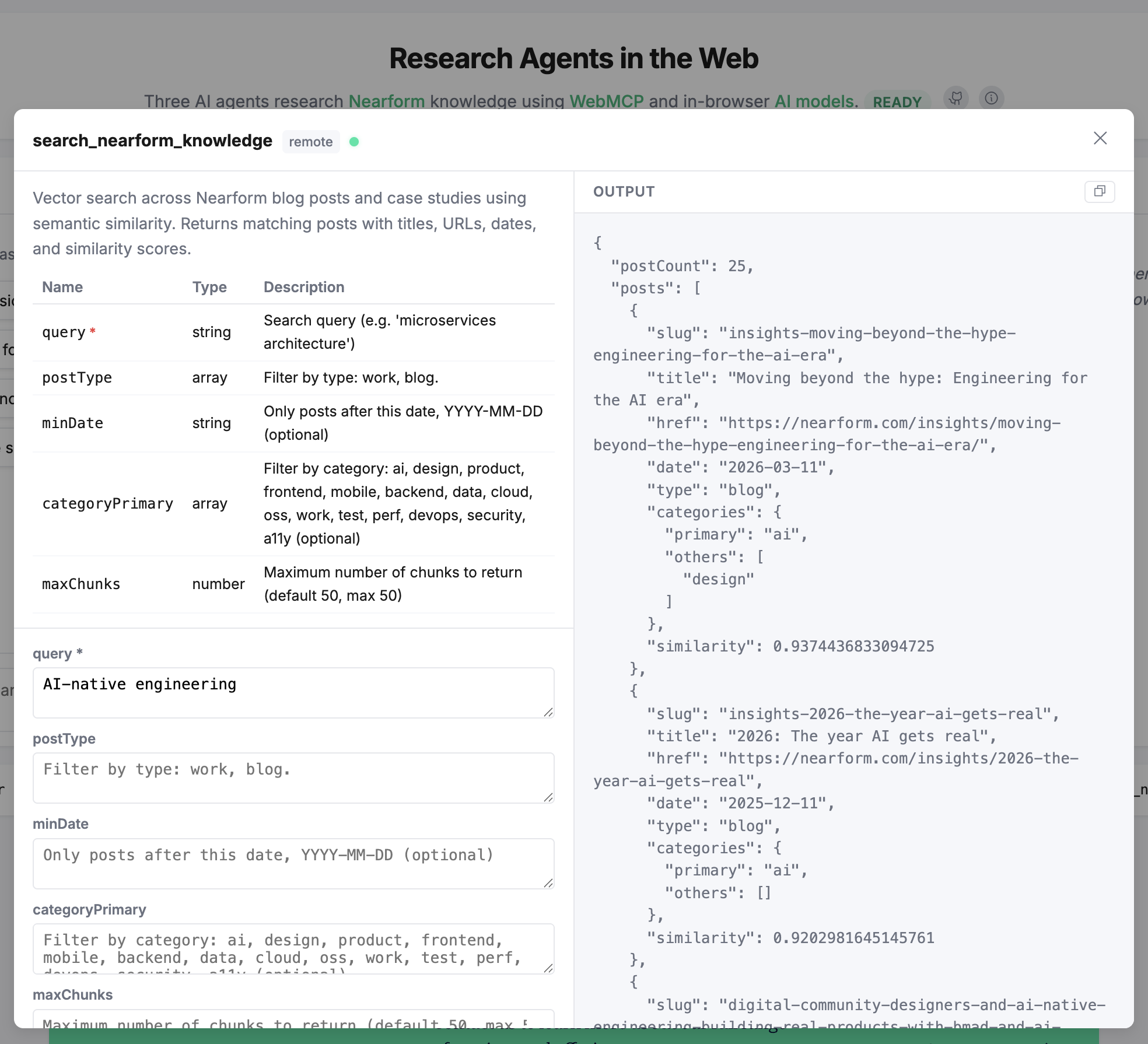
The Web Agents demo application integrates three main WebMCP tools: one remote and two local. For convenience, the demo app has a built-in WebMCP tool calling modal that you can access by clicking on the name of any of the integrated tools (directly available via the links below):
take_notes: Local tool, schema here. Set or clear the notepad content.
read_notes: Local tool, schema here. Get the notepad content.
The remote knowledge search tool with a query for “AI-native engineering.”
The two local tools are easily created with navigator.registerTool, but how do we get the remote search_nearform_knowledge tool from a different website (our vector search demo)?
Sharing tools across websites still lacks first-class support, so we reach for MCP-B again, this time using iframe transports from @mcp-b/transports. We run a small, custom MCP-style iframe server in vector-search-web. And then we create an iframe bridge in web-agents to discover and call the search_nearform_knowledge tool.
In one sense, this is cheating. We could expose the underlying searchPosts function that vector-web-search uses via an iframe, without any need for WebMCP, as iframes are powerful, flexible, and the Swiss Army knife of frontend communication. But WebMCP provides a predictable structure for describing, discovering, and calling tools. And in the not-too-distant future, we’ll have many more tool consumption capabilities for agents and humans alike.
With the remote search_nearform_knowledge tool available to us over our bespoke iframe bridge, we have all three tools wired up. The remaining question is: can an on-device language model actually orchestrate them?
On-device agents: powerful but constrained
Our demo features three agents (Coordinator, Researcher, Writer) who can research and respond to queries about Nearform’s content and expertise. To make things even more challenging, we continued our push with Web AI tools and crafted these agents using in-browser language models via the Chrome Prompt API. The model used is variable based on your browser and preferences. In my browser, at the Model Status tab in chrome://on-device-internals/, my M2 MacBook Air reports a backend type of GPU (highest quality), and Chrome has installed the v3Nano model (4GB in size). Among in-browser language models, the Chrome Prompt API is one of the most capable and flexible, but compared to familiar cloud-based foundation models, it’s an entirely different world.
While we’re not going to spend a ton of time on the Prompt API (we’ll definitely have in-depth posts on in-browser models in the future), there are some limitations that we need to tackle first to dig into our agents demo.
Handling really small context
The first limitation is that the Prompt API has an extremely limited context window. Here’s a simple way to see this in action:
const session =awaitLanguageModel.create();const answer =await session.prompt("What is the capital of France?");console.log(`Answer: ${answer}`);// The context APIs are in transition (new / old)const used = session.contextUsage?? session.inputUsage;const available = session.contextWindow?? session.inputQuota;console.log(`Context: ${used}/${available}`);
jsx
My machine reliably reports a total available context of around 9,000 tokens. This is practically nothing compared to the modern foundation model. Claude Sonnet and Opus just passed 1 million token context windows for general usage. But it’s still enough to do some useful work. For the demo, this limitation is one of the reasons that we chose to implement a multi-agent system. We have a dedicated Coordinator tasked solely with deciding which research or writing tasks to assign; the researcher uses context to make tool calls and generate research findings; and the writer then uses the compacted research findings to write the research notepad and formulate answers for the Coordinator to send to the user. We trade off time (this is much longer) and complexity (3 agents instead of 1) so that the context we need in the demo app is minimized, and we have more context available for things like the rest of the user conversation and more. But context was just one constraint. The other is that the model can’t actually call our tools… yet.
Actually doing a tool call
We glossed over the actual calls to our WebMCP tools earlier. And while it’s early days for calling WebMCP via foundation models, Chrome’s LanguageModel abstraction cannot do any tool calls yet!
Fortunately, the W3C steering group’s Prompt API proposal already has an accepted, detailed specification of tool calling, which will presumably land in Chrome in the future. In the meantime, developers have already developed simple polyfills for tool calling. The Web Agents demo includes future-ready detection of the tool feature and, for now, backstops by making a structured, separate LanguageModel call to obtain appropriate tool input parameters for a direct call to our WebMCP tools. For example, if we have the query “What is AI-native engineering and how does it change product development?” our Researcher agent will translate this to a tool call that looks like:
With these notes, you are encouraged to go try out the Web Agents demo a bit more! The Agent Activity pane contains all the internal events that correspond to everything we’ve discussed in the article, and you can click to drill into more information for most of them (including inputs, outputs, prompts, tool calls, etc.). It may be a bit slow (welcome to on-device AI, folks), but it’s a fully functional, multi-agent system with remote tool calling. Even with those rough edges, the demo shows something meaningful about where the web is heading.
Early days, clear direction
We covered a lot of nascent web AI technologies in this article, from WebMCP that doesn’t yet have consumers, to on-device language models that can’t call tools and have limited context windows. And yet, we were able to build a fully functional agentic system that is an early parallel to what we accomplished in backend AI systems a few years ago. And the rate of change and adoption of these web AI tools is truly astounding. It won't be long before these gaps close as the underlying technologies mature.
The overall direction is really clear that our web applications will evolve to provide native interaction tools for agents, and the agentic user will be a first-class concern, along with our traditional human users. And our web applications will use not just the familiar, full-featured cloud AI services, but also on-device language models and agents for situations that require extra privacy, offline capabilities, and more.
At Nearform, we’re continuing to push the edge on emerging AI potential as we look to a more agentic future for the web. If your team is aiming to understand where these technologies can fit into your product strategy or how to navigate the new web AI world, reach out to the Nearform team. We’d love to talk about what's working now and what's coming next.
But wait - there's more.
Nearform publishes real-world learnings on data & AI, engineering, and digital strategy - with more merged in weekly.
Insights
Perspectives on AI in engineering, product development, and strategy, for enterprise executives.