Handling HTTP timeouts in FastifyHandlingHTTPtimeoutsinFastifyHandlingHTTPtimeoutsinFastify
Manuel Spigolon
29 May 2025
Share
We share smart strategies for ensuring a slow client doesn’t crash your server
The hardest part of my job is thinking like a malicious user... or like an AI in its early stages of writing HTTP servers!
This exercise is not easy because I love my clients' HTTP requests, and I'm sure they love my server!
But that is not always the case... for this reason, we must be prepared to handle unexpected situations.
In this article, we will explore all the options available in Fastify to handle timeouts!
A poorly implemented client or a malicious user could kill your server if we are not careful!
How many timeouts do I need?
Before listing all the timeout options available in Fastify, let's take a moment to understand the HTTP request lifecycle and identify where we need to set timeouts.
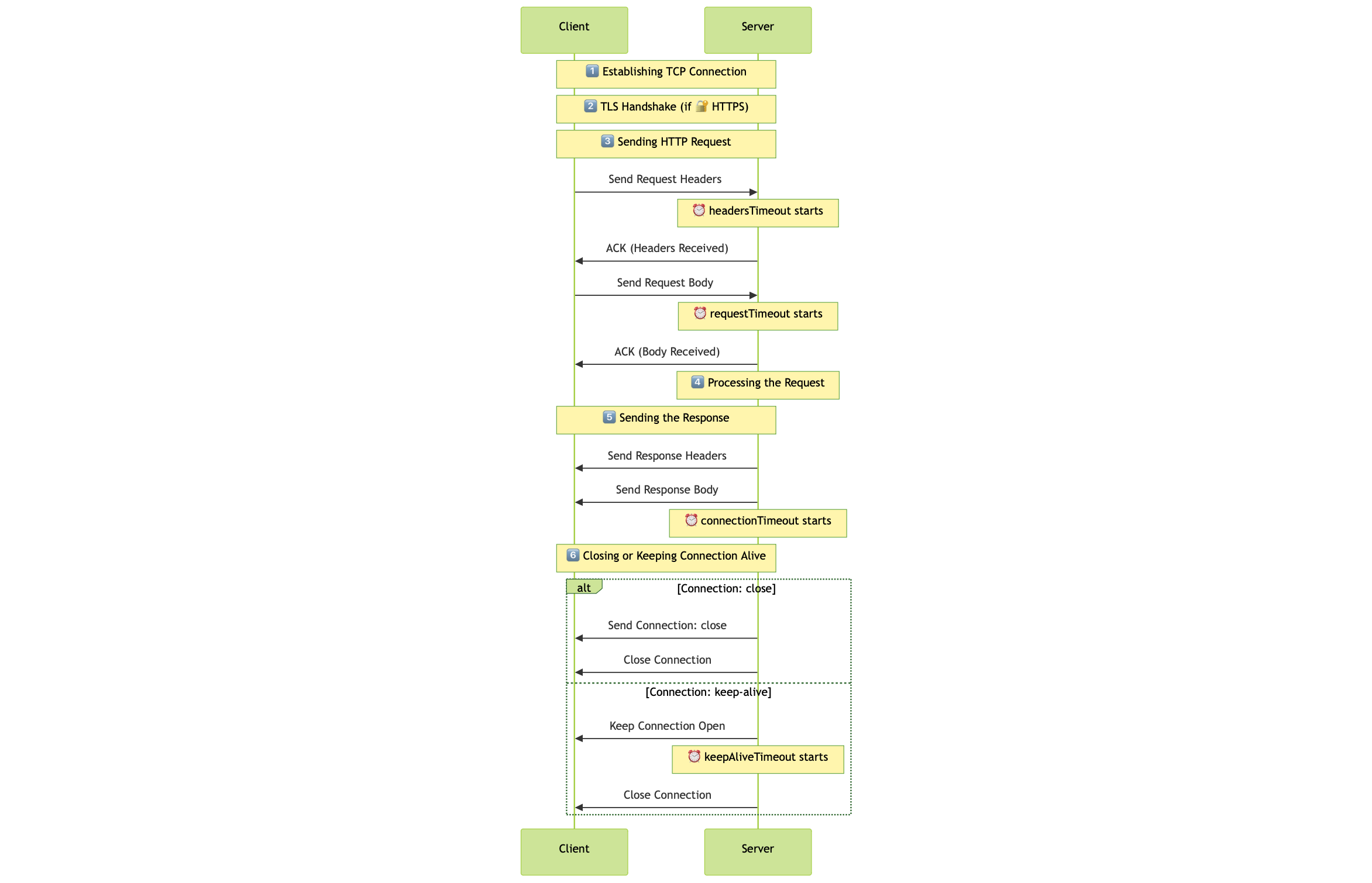
In the following diagram, we can see a simplified HTTP request lifecycle that includes the most important steps:
Establishing a TCP connection to create a socket.
TLS handshake (if using HTTPS).
At this stage, the socket is open, and the server is waiting for the client to send the HTTP request as the protocol requires.
The server receives the request and processes it.
The server sends the response to the client.
The server either closes the connection or keeps it alive for future requests using the same socket.
In the diagram, the timeouts are represented with a clock icon ⏰.
So, let's review them all (note that the default values are Fastify defaults, not the Node.js ones):
Timeout setting
Description
headersTimeout
Specifies the number of milliseconds to wait for the complete HTTP headers to be received. If the headers are not received within this period, the connection is terminated. Default:no-limit.
requestTimeout
Defines the maximum duration, in milliseconds, to wait for the entire request from the client. If the request body isn't fully received within this time frame, the connection is closed. Default:no-limit.
connectionTimeout (aka timeout)
Sets the socket inactivity timeout in milliseconds. If there's no activity on the socket for the specified duration, the server closes the connection. Default:no-limit.
keepAliveTimeout
Determines the time, in milliseconds, to wait for additional requests on a persistent connection (keep-alive). If no new request is received within this period, the server closes the connection. Default: 72 seconds.
connectionsCheckingInterval
Sets the interval value, in milliseconds, to check for request and headers timeout in incomplete requests. Default: 30,000.
Wow, that's a lot of timeouts! But why do we need all of them?
All these timeouts are crucial to ensuring that the server can handle incoming requests efficiently and prevent resource exhaustion. Otherwise, a malicious user could send a request with a large payload and keep the connection open indefinitely, causing the server to run out of memory or file descriptors!
For example, headersTimeout ensures that the server doesn't wait indefinitely for the client to send the headers.
This option helps prevent the Slowloris attack, where an attacker sends headers very slowly to keep the connection open and exhaust server resources.
Now that we understand timeouts and their importance, let's see how to set them up in Fastify.
Setting up timeouts in Fastify
To configure timeouts in Fastify, we must pass the options when creating the Fastify instance.
Here's a TL;DR example:
importfastifyfrom"fastify";const app =fastify({// 2 minutes: a reasonable timeout for processing requests, balancing performance and user experienceconnectionTimeout:120_000,// 1 minute: suitable for most payloads, including moderate file uploadsrequestTimeout:60_000,// 10 seconds: ensures efficient resource usage for idle connectionskeepAliveTimeout:10_000,http:{// 15 seconds: prevents slow clients from holding connections too longheadersTimeout:15_000,},});
jsx
These are general recommendations, and the actual values may vary based on your application and use case.
Be sure to think about the following:
Protect the server: Prevent resource exhaustion by limiting how long connections can remain open or idle.
Enhance client experience: Provide sufficient time for legitimate requests, even under less-than-ideal network conditions.
Balance performance and security: Avoid excessively long timeouts that could lead to inefficiency or abuse, while ensuring the server remains responsive.
Now, let's test the timeouts!
I created a simple Fastify v5 server and a client to test the timeouts.
For the sake of simplicity, the code can be found on GitHub and is not included in this article.
Testing timeouts
If you have downloaded and installed the code from the GitHub repository, we can run the server with Node.js v20+ and the following command, and we can set the timeouts via optional arguments:
# To start the servernode server.js --connectionTimeout 10000\ --requestTimeout 20000\ --keepAliveTimeout 5000\ --headersTimeout 30000\ --handlerTimeout 5000\ --connectionsCheckingInterval 10000
bash
Then, we can run the client with the following command, where we can set the payload and header rate:
-headerRate: we send a header every headerRate milliseconds
-payloadRate: we send a byte every payloadRate milliseconds
-keepAlive: if set, the client will keep the connection alive but will not send any new request
# To start the clientnode low-level-client.js --headerRate 1000\ --payloadRate 1000
bash
Cool! Now we can test the timeouts by running a simple command!
Test the headersTimeout
Straight to the point: let's test the headersTimeout by sending a request with a very slow header rate.
# Set the header timeout to half a secondnode server.js --headersTimeout 500# Set the header rate to 1 secondnode low-level-client.js --headerRate 1000
bash
The expected output is a timeout error, because the server will wait for 500 milliseconds to collect all the headers, but the client will send one header every second.
But, if we run those commands, we will see that the server will not throw any error 😱!
➜ node low-level-client.js --headerRate 1000Connected to server
Sent Header: Host: localhost
Sent Header: User-Agent: Slow-Client
Sent Header: Accept: application/json
Sent Header: Content-Type: application/json
Sent Header: Content-Length: 83Sent Header: Connection: keep-alive
Finished sending headers. Now sending body...
{"message":"Hello, this is a slow request!","timestamp":"2025-03-30T14:02:08.156Z"}Received response: HTTP/1.1 200 OK
content-type: application/json;charset=utf-8
content-length: 17Date: Sun, 30 Mar 202514:02:22 GMT
Connection: keep-alive
Keep-Alive: timeout=72{"hello":"world"}Disconnected from server after 14338 ms
bash
The reason is that Node.js does not check the timeouts so frequently. Actually, the default connectionsCheckingInterval configuration is set to 30 seconds, so the server will check the timeouts every 30 seconds.
This makes sense, because checking all the sockets every few milliseconds would be a waste of CPU resources. As always, we developers need to find a balance between performance and security.
So, for the sake of this article, let's set the connectionsCheckingInterval to 100 milliseconds to appreciate the timeouts in real time, or if you would like to see a real Slowloris attack in action, set the headerRate to 60 seconds!
Connected to server
Sent Header: Host: localhost
Received response: HTTP/1.1 408 Request Timeout
Content-Length: 71Content-Type: application/json
{"error":"Request Timeout","message":"Client Timeout","statusCode":408}Disconnected from server after 549 ms
bash
Test result
Now, we can run a lot of tests with different timeouts and payloads to see how the server behaves. Here is a summary of the tests I ran (considering the connectionsCheckingInterval set to 100 milliseconds):
Test
Client args
Server args
Result
Slow headers
--headerRate 1000
--headersTimeout 500
Timeout error: because the server will wait for 500ms to receive the headers, but the client will send one header every second.
Slow payload
--payloadRate 1000
--requestTimeout 5000
Timeout error: because the server will wait for five seconds to receive the payload, but the client will send one byte every second.
Keep-alive connection
--payloadRate 1 --keepAlive
--keepAliveTimeout 4000
After completing the request, the socker will be ended by the server after four seconds.
Slow server handler
--headerRate 1
--connectionTimeout 10000 --handlerTimeout 60000
Timeout error: because the server will wait for ten seconds to process the whole request, but the server handler will take 60 seconds to process the request.
Now we can see that the server is able to handle the timeouts correctly and, the client is able to receive the timeout errors.
Use those scripts to test the timeouts in your own environment and see how they behave.
Summary
In this article, we explored the different timeouts available in Fastify and how to configure them.
We also tested them with a simple Fastify server and a custom socket.
We learned that timeouts are essential for preventing resource exhaustion and ensuring that
the server efficiently handles incoming requests.
Keep in mind that every application is different, but we should never forget to set timeouts!